Every WordPress site needs help at some point. A plugin breaks. An update fails. The site slows down or goes offline. When that happens, the way you buy support matters as much as the help itself. This is where WordPress support plans come in.
There are three main ways to pay for help: a monthly plan, an hourly rate, or a one-time fix. Each model fits a different kind of site and budget. This guide compares all three in plain English. By the end, you will know which option gives you the best value and the least stress.
What Are WordPress Support Plans?
A WordPress support plan is an agreement to get expert help with your website. The plan sets what you pay, what tasks are covered, and how fast someone responds. Some plans cover routine care, like updates and backups. Others cover urgent repairs when something breaks.
Support is not the same as maintenance, though the two overlap. Maintenance keeps your site healthy over time. Support solves specific problems when you ask. If you want a deeper breakdown, read our guide on the difference between WordPress maintenance and support.
The Three Main WordPress Support Models
Almost every provider sells help in one of three ways. Let us look at each one, with its strengths and its trade-offs.
1. Monthly Support Plans (Retainers)
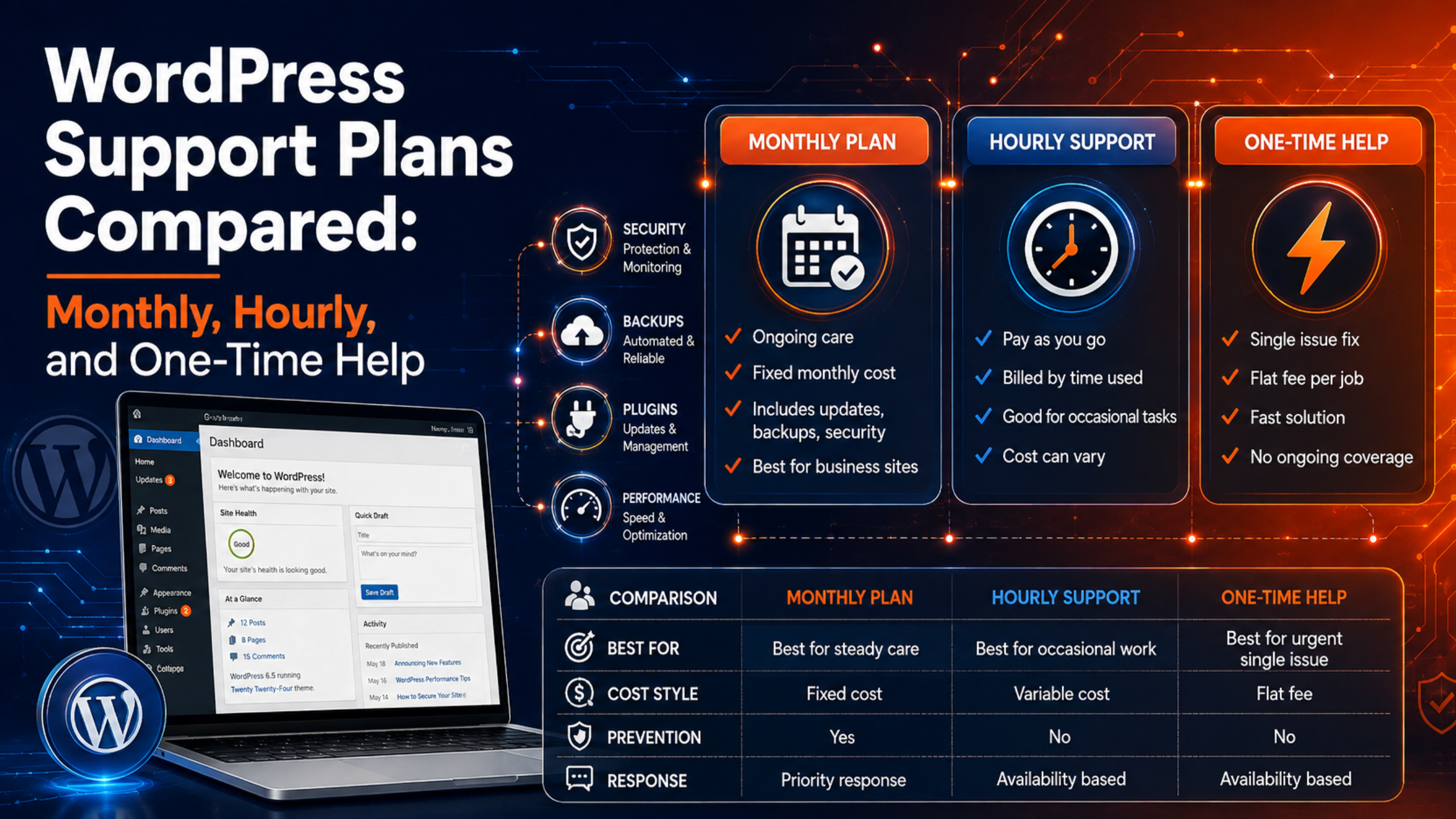
A monthly plan is a fixed fee you pay each month. In return, you get ongoing care and a set amount of help. This is the most popular model for small and mid-sized businesses.
Most monthly plans include a clear list of tasks. These usually cover:
- Core, theme, and plugin updates, often tested on a staging copy first
- Regular off-site backups
- Security scans and malware monitoring
- Uptime checks that alert someone if the site goes down
- A block of support time for small fixes and questions
The big benefit is predictability. You know the cost, and problems get caught early. Prevention is almost always cheaper than emergency repair. The main downside is that you pay even in quiet months when nothing breaks.
2. Hourly Support (Pay As You Go)
Hourly support means you pay only for the time an expert spends on your site. You send a task, they log the hours, and you get a bill. There is no ongoing fee.
This model works well for one-off jobs that still need care. Think of a design tweak, a new feature, or a bug that keeps coming back. Many providers bill in small increments, such as 15 minutes, so you do not overpay for quick tasks.
The trade-off is cost control. Hourly work can add up fast, and emergency rates are much higher. Fixes outside normal business hours often cost far more per hour than planned work. You also carry the risk. If a small issue turns into a big one, the hours grow.
3. One-Time Fixes
A one-time fix is exactly what it sounds like. You have a single problem, you pay a flat fee, and the expert solves it. Once the job is done, the relationship ends. There is no plan and no monthly cost.
This suits people who rarely need help and just want one issue solved. A common example is a white screen error or a broken checkout page. Our guide on what WordPress support can fix shows the kinds of problems that fit this model.
The catch is that a one-time fix treats the symptom, not the cause. Nothing stops the next problem from appearing. If your site breaks often, paying for repeated one-time jobs can cost more than a plan.
WordPress Support Plans Compared Side by Side
Here is a quick comparison to help you see the differences at a glance.
| Feature | Monthly Plan | Hourly Support | One-Time Fix |
|---|---|---|---|
| Best for | Sites that need steady care | Occasional projects and tweaks | A single, clear problem |
| Cost style | Fixed and predictable | Variable, based on time | Flat fee per job |
| Prevention included | Yes | No | No |
| Response speed | Fast, often priority | Depends on availability | Depends on availability |
| Main risk | Paying in quiet months | Hours can add up | Problem may return |
How Much Do WordPress Support Plans Cost?
Prices vary by the size of your site and the depth of the service. Still, a few clear ranges hold true across the industry in 2026.
Monthly plans usually run from about $50 to $200 per month for small and mid-sized business sites. Basic care can start near $30 a month. Full-service plans with staging tests and a dedicated developer can reach $500 or more. The gap comes down to human involvement. A cheap plan may only run automated updates. A higher-tier plan adds testing, regression checks, and a real person who reviews your site.
Hourly rates are higher per unit of time. Planned development often bills around $150 per hour. Emergency work can climb to $200 to $500 per hour, especially at night or on weekends. One-time fixes are usually priced as a flat fee that reflects a similar hourly value.
For a full breakdown with real numbers, see our detailed post on how much WordPress support costs. You can also view current packages on our WordPress support pricing page.
Which WordPress Support Plan Is Right for You?
The best plan depends on how you use your site and how much risk you can accept. Use these simple rules to decide.
Choose a Monthly Plan If…
Pick a monthly plan when your website drives your business. If you take orders, book leads, or publish often, downtime costs you money. A monthly plan keeps the site updated and watched, so small issues get caught before they grow. This model is ideal for online stores and busy service sites. If you run a shop, our page on support for WooCommerce explains what store owners get.
Choose Hourly Support If…
Pick hourly support when you have a stable site and only need help now and then. This fits owners who can handle basic tasks themselves but want an expert on call for bigger jobs. It also works for planned projects, like adding a feature or improving speed. Our performance optimization service is a good example of project-based work.
Choose a One-Time Fix If…
Pick a one-time fix when you have a single, urgent problem and no plan to keep. Maybe your site shows an error and you just need it back online. This is the fastest way to solve one issue without a commitment. Just remember that it does not protect you from the next problem.
How to Get the Most From Your Support Plan
Whatever model you choose, a few habits will help you get better value and fewer surprises.
- Always keep a recent backup. Before any update or fix, make sure a fresh backup exists. A safe restore point turns a scary change into a low-risk one.
- Ask for staging tests. Good providers test changes on a copy of your site first. This is the idea behind a safe update pipeline, which reduces the chance that an update breaks your live site.
- Keep a simple issue log. Note what broke and when. Patterns help your provider fix the root cause, not just the symptom.
- Confirm response times in writing. Know how fast help arrives, and whether urgent issues get priority.
If you are still weighing providers, our guide on how to choose a reliable WordPress support company walks through the key questions to ask.
Common Mistakes When Choosing a Support Plan
Many owners pick the wrong model and pay for it later. Avoid these common traps.
The first mistake is buying on price alone. A very cheap plan may only run automated updates with no testing. When an update breaks the site, you are on your own. Look at what the plan actually covers, not just the monthly number.
The second mistake is waiting until a crisis to find help. Emergency rates are the most expensive way to buy support. If you set up a plan before trouble hits, you avoid those peak fees and get faster help. Downtime is costly, and even a few hours offline can cost a busy site more than a year of preventive care.
The third mistake is ignoring response times. A low price means little if you wait days for a reply while your site is down. Always confirm how fast a provider responds, and whether urgent issues jump the queue. A clear service promise is worth more than a small discount.
Frequently Asked Questions
Can I switch between plans later?
Yes. Many owners start with a one-time fix, then move to a monthly plan once they see the value of steady care. You can also scale a monthly plan up or down as your needs change.
Is a monthly plan worth it for a small site?
Often, yes. Even a small site faces security risks and update failures. A basic monthly plan costs little and prevents the expensive emergencies that hourly rates create. Learn more in our guide to WordPress support for small businesses.
What does a support plan usually include?
Most plans include updates, backups, security monitoring, and a block of support time. The exact list varies by provider. See what a WordPress support service includes for a full picture.
Does hosting support replace a support plan?
No. Hosting support covers the server, not your WordPress site, themes, or plugins. Read about managed hosting versus a support service to see where the line falls.
Conclusion
The right WordPress support plan comes down to how much your site matters and how much risk you want to carry. A monthly plan gives steady care and peace of mind. Hourly support offers flexibility for occasional work. A one-time fix solves a single problem fast, but leaves the door open to the next one.
For most business websites, a monthly plan delivers the best long-term value. It catches issues early and keeps costs predictable. If you are unsure, start small, watch how often you need help, and adjust from there. Whatever you choose, keep a recent backup and work with a provider who tests changes before they go live. That simple habit protects your site no matter which plan you pick.

James is an experienced WordPress and WooCommerce specialist with over 10 years of practical experience. At WPChatSupport, he creates clear guides that help website owners fix WordPress issues, improve speed, secure their sites, and manage WooCommerce stores with confidence. His expertise includes store setup, plugin configuration, theme customization, payment gateway integration, and website troubleshooting. Through simple and helpful content, James supports users in solving technical problems and following best practices for online business growth.