When your WordPress site needs looking after, two very different services promise to help: managed WordPress hosting and a WordPress support service. They sound similar, and the names often overlap, but they solve different problems. Choosing the wrong one leaves gaps that cost you time when something breaks.
This guide explains what each service really includes, where they stop, and how to decide which one your website needs, or whether you need both.
What is managed WordPress hosting?
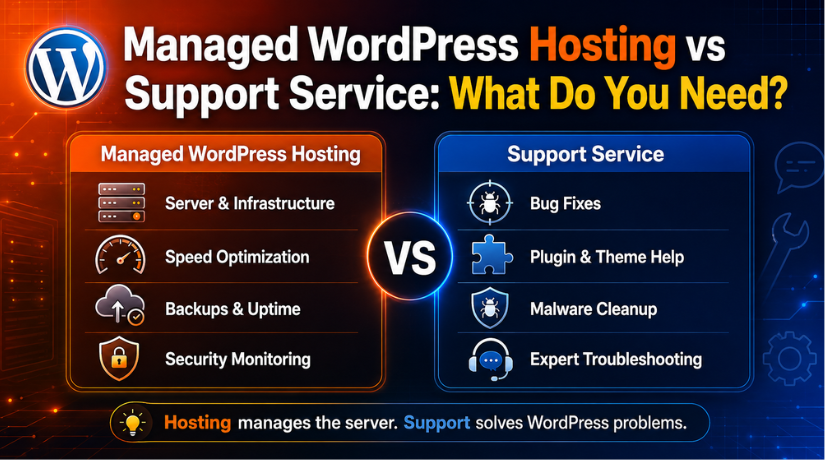
Managed WordPress hosting is a hosting plan where the provider handles the technical side of running the server for you. Instead of a bare server, you get an environment tuned for WordPress, with much of the routine maintenance automated.
A typical managed plan includes:
- Automatic core, plugin, and theme updates on a schedule.
- Automated backups, often daily, with one-click restore.
- Server-level caching and a CDN for faster load times.
- Built-in security, such as a web application firewall and malware scanning.
- A staging environment to test changes before they go live.
The focus is the platform your site runs on. Managed hosting keeps the server fast, secure, and up to date so you do not have to manage it yourself.
What is a WordPress support service?
A WordPress support service is hands-on help with your website itself. Rather than managing a server, a support team fixes problems, makes changes, and answers questions about your specific site. Most support services work with any host, so you keep your current hosting and add expert help on top.
A support service typically covers:
- Fixing errors and crashes, from the White Screen of Death to broken checkouts.
- Plugin and theme troubleshooting when something conflicts or breaks.
- Small edits and customizations, like layout tweaks or new features.
- Malware cleanup and hardening after a hack.
- Guidance and advice for changes you are unsure about.
The focus is your website’s content, design, and functionality, the parts your visitors actually see and use. For a fuller breakdown, see what a WordPress support service includes.
Managed hosting vs support service: key differences
| Feature | Managed WordPress hosting | WordPress support service |
|---|---|---|
| Main focus | The server and platform | Your specific website |
| Updates | Automatic, scheduled | Done and tested on request |
| Backups | Automated by the host | Managed and restored on demand |
| Fixing site errors | Limited or extra cost | Core service |
| Design and edits | Not included | Included |
| Works with any host | No, tied to their servers | Yes |
| Human help | Mostly server issues | Any website issue |
What each one does not cover
This is where sites get caught out. Managed hosting keeps the server healthy, but it usually will not fix a plugin conflict, redesign a page, or debug your contact form. Those are site-level jobs. When you ask, many hosts point you back to your developer.
A support service, on the other hand, fixes the site but does not own the server. If the underlying hosting is slow or unreliable, a support team can advise you, but they cannot rebuild the host’s infrastructure. Each service has a clear lane.
Which do you need?
Match the service to your situation:
- You want a fast, secure server and little else to manage: managed hosting is a strong fit.
- Your site keeps breaking, or you need edits and fixes: a support service is what you actually need.
- You are on cheap shared hosting and things go wrong often: a support service adds the human help your host does not provide.
- You run a store or a business site where downtime costs money: you likely benefit from both.
A helpful test: if your problem is “the server is slow or down,” think hosting. If your problem is “something on my site is broken or needs changing,” think support. Still deciding on budget? Our guide on how much WordPress support costs can help.
Can you use both together?
Yes, and many site owners do. Managed hosting takes care of the platform while a support service takes care of the website. The two complement each other neatly.
Some providers even combine them, offering support and hosting under one roof. The advantage is simple: with one team responsible for both the server and the site, there is no finger-pointing when something breaks, and problems get solved faster because the team has full access. It also helps to understand how ongoing care differs from one-off fixes, which we cover in WordPress maintenance vs support.
Frequently asked questions
Does managed hosting include support?
It includes server support, such as uptime and performance. It does not usually include fixing problems inside your site, like plugin conflicts or design errors. Read the plan details carefully, since “managed” means different things to different hosts.
Can a support service move me to better hosting?
Yes. A support team can recommend a suitable host and handle the migration for you, then keep maintaining the site afterward on the new server.
Is managed hosting enough on its own?
For a simple, stable site, it can be. For a busy store or a site that changes often, you will likely still want a support service for the hands-on fixes and edits hosting does not cover.
Which is more cost-effective?
It depends on your needs. Managed hosting bundles server care into a monthly fee. A support service is best when you need real help with the website. Many owners find the combination gives the best value and the fewest surprises.
Conclusion
Managed WordPress hosting and a WordPress support service are not rivals. One looks after the server; the other looks after the site. Decide by naming your problem: platform issues point to hosting, and website issues point to support. If your site matters to your business, the two together give you speed, safety, and someone to call when things go wrong. To learn more about the platform itself, the official WordPress.org hosting page and WordPress.com support resources are useful references. Still unsure what a support team handles day to day? See our guide on what WordPress support can fix.

James is an experienced WordPress and WooCommerce specialist with over 10 years of practical experience. At WPChatSupport, he creates clear guides that help website owners fix WordPress issues, improve speed, secure their sites, and manage WooCommerce stores with confidence. His expertise includes store setup, plugin configuration, theme customization, payment gateway integration, and website troubleshooting. Through simple and helpful content, James supports users in solving technical problems and following best practices for online business growth.