WordPress maintenance and WordPress support sound like the same thing. They are not. Both keep your site healthy, but they do different jobs. If you mix them up, you can pay for the wrong plan or leave a gap in your site’s care.
This guide explains each one in plain terms. You will see what maintenance covers, what support covers, how they overlap, and which one your website needs.
What is WordPress maintenance?
WordPress maintenance is the routine care your site needs to stay healthy. It runs on a set schedule, often monthly. You do not have to ask for it each time. It just happens in the background.
Think of it like a regular service for your car. The work is planned, steady, and preventive. Its goal is to stop problems before they start.
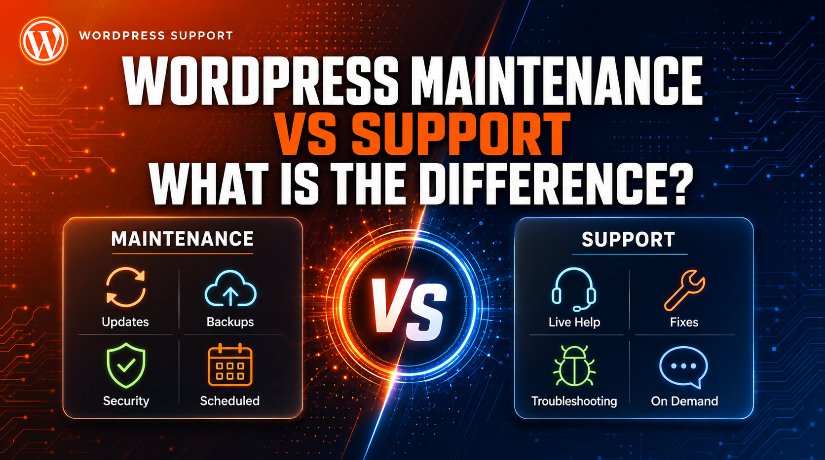
Maintenance usually includes:
- Updating the WordPress core, themes, and plugins
- Running regular backups so you can restore the site fast
- Security scans and malware checks
- Database cleanup to keep the site tidy
- Uptime and performance checks
Before any update, a good team takes a fresh backup first. That way, if an update breaks something, they can roll it back in minutes.
What is WordPress support?
WordPress support is expert help when you have a specific problem or request. It is reactive. You reach out, and a person helps you solve the issue.
Think of it like calling a mechanic when your car makes a strange noise. You need a fix for one clear problem, right now.
Support usually covers:
- Fixing errors, bugs, and broken features
- Recovering a hacked or down website
- Sorting out login or plugin conflicts
- Small content or design changes you request
- Advice and troubleshooting over chat, email, or phone
Support is hands-on and personal. You explain the issue, and the team works with you until it is solved. Many providers offer live chat support so you get answers fast.
Maintenance vs support: the key differences
Both services protect your site, but they work in different ways. Here is how they compare.
- Timing: Maintenance is scheduled and ongoing. Support is on demand, when you need it.
- Approach: Maintenance is preventive. Support is reactive.
- Work involved: Maintenance is routine tasks. Support is problem-solving and custom help.
- Who starts it: Maintenance runs on its own. You start a support request.
- Goal: Maintenance stops problems. Support fixes problems.
In short, maintenance keeps the lights on. Support steps in when something goes wrong or you need a change.
Where the two overlap
The line is not always sharp. Many providers bundle both into one plan. That is why the terms get mixed up.
For example, a security scan is maintenance. But cleaning up a site after a hack is support. A backup is maintenance. Restoring that backup during an emergency is support.
Because they connect so closely, most quality plans include both. To see how a full plan is built, read our guide on what a support service includes.
Do you need maintenance, support, or both?
Most websites need both, and here is why. Maintenance keeps your site secure and up to date. Support is there for the moments maintenance cannot predict, like a sudden error or a custom request.
Use this simple guide:
- Choose maintenance if your main worry is updates, backups, and security running on autopilot.
- Choose support if you mostly need expert help for one-off fixes and changes.
- Choose both if you want a safe, healthy site plus fast help when issues appear. This suits most business sites.
Not sure which fits? You may also be weighing whether to hire an agency or a freelancer for the job. And before you buy, it helps to know how much support costs.
How to choose the right plan
Once you know what you need, picking a plan gets easy. Follow these steps.
- List your needs. Do you want steady upkeep, on-demand help, or both? Write it down.
- Check the scope. Confirm the plan covers updates, backups, and security, plus real support hours.
- Ask about response times. For a busy site, fast help is worth paying for.
- Compare value, not just price. A cheap plan that skips backups can cost you more later. Compare care plans side by side.
Frequently asked questions
Is maintenance the same as support?
No. Maintenance is scheduled, routine care like updates and backups. Support is expert help for specific problems and requests. Many plans include both.
Can I get support without a maintenance plan?
Yes. Some providers offer one-time or hourly support. This works if your site is healthy and you only need help now and then.
Does maintenance stop my site from ever breaking?
No plan can promise that. But good maintenance greatly lowers the risk. Support is there for the rare times something still goes wrong.
Which one saves me more money?
Together, they usually save the most. Maintenance prevents costly problems, and support fixes issues fast before they grow.
Conclusion
WordPress maintenance and support are not the same, but they work best as a team. Maintenance is the steady, preventive care that keeps your site secure and up to date. Support is the expert help you call on when a problem or request comes up.
For most websites, the smart move is to have both. List your needs, check the scope, and pick a plan that keeps your site safe while giving you fast help when you need it.

James is an experienced WordPress and WooCommerce specialist with over 10 years of practical experience. At WPChatSupport, he creates clear guides that help website owners fix WordPress issues, improve speed, secure their sites, and manage WooCommerce stores with confidence. His expertise includes store setup, plugin configuration, theme customization, payment gateway integration, and website troubleshooting. Through simple and helpful content, James supports users in solving technical problems and following best practices for online business growth.