A B2B website is a sales tool. It builds trust, captures leads, and feeds your pipeline. When it slows down or breaks, you do not just lose visitors. You lose deals that were worth thousands of dollars each.
Yet many companies treat their WordPress site as a one-time project. They launch it, then leave it alone. Over time, that neglect creates security gaps, broken forms, and slow pages. This guide explains the common problems B2B sites face, what a good support plan covers, and the real benefits of ongoing care.
Why B2B websites need ongoing WordPress support
B2B buying is slow and considered. A prospect may visit your site many times before they contact sales. Each visit must load fast, look professional, and work without errors. One broken form or slow page can end the relationship before it starts.
B2B sites also carry more complexity than a simple brochure site. They often connect to a CRM, run gated content, host multi-step forms, and publish a steady stream of articles. Every integration and plugin adds a point that can fail.
Because the stakes are high, B2B WordPress support focuses on reliability and lead capture. It keeps the site secure, fast, and always ready for the next qualified visitor. If you also run a smaller operation, our guide to WordPress support for small businesses covers the basics that apply to every company site.
Common problems B2B WordPress websites face
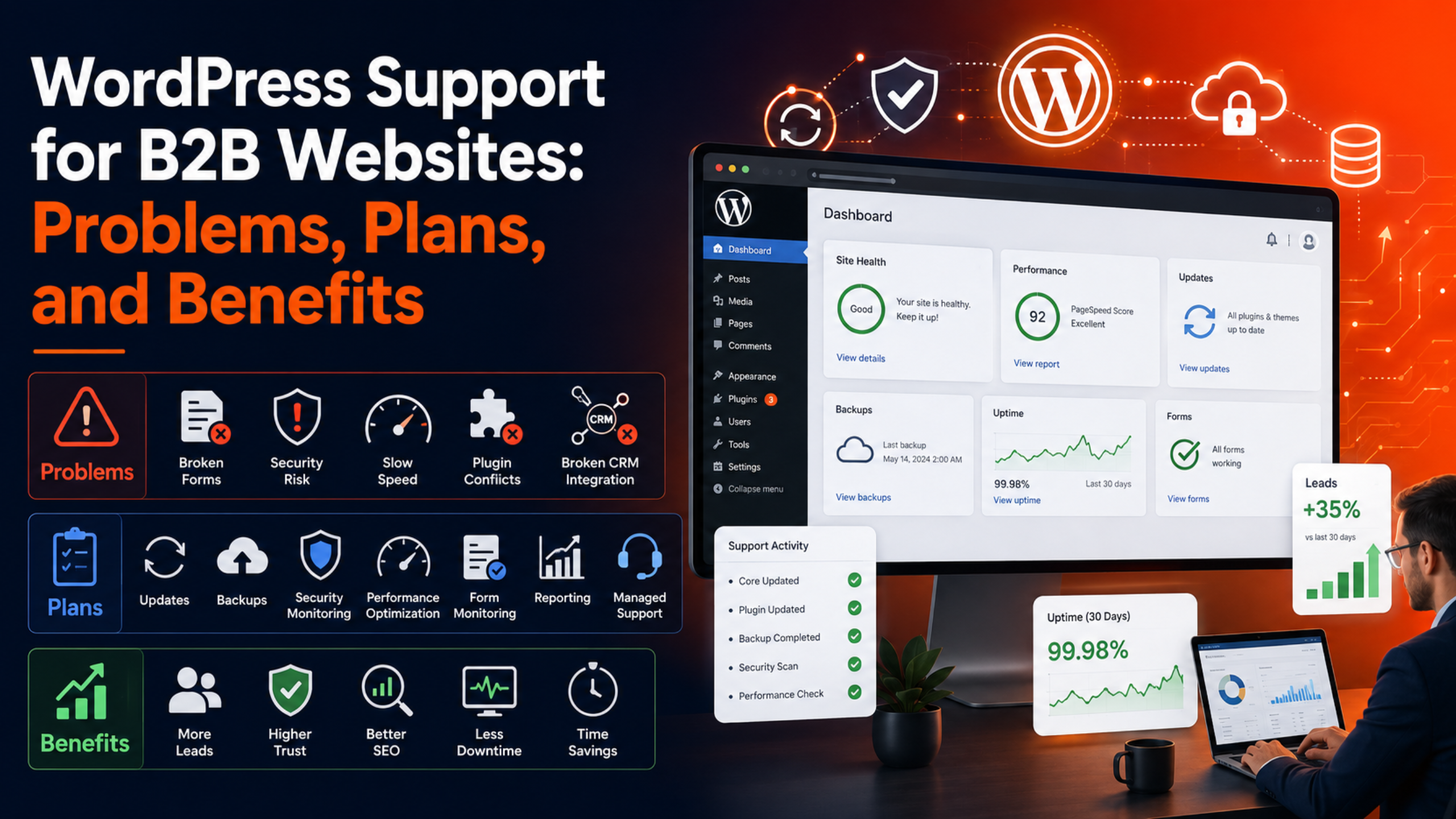
Most B2B site issues fall into five groups. Knowing them helps you see why support matters.
1. Broken or leaking lead forms
Your forms are your lead engine. But form emails often stop sending after a plugin update or a server change. When that happens, leads vanish silently. You may not notice until sales asks why the pipeline dried up.
Support teams test your forms on a schedule. They confirm each submission reaches the right inbox and CRM. They also set up reliable email delivery, so no lead slips through the cracks.
2. Security risks and data exposure
B2B sites hold valuable data. Contact records, gated downloads, and account logins all attract attackers. A breach can leak client data and damage the trust you spent years building.
Ongoing support adds a firewall, malware scans, and login protection. The team watches for threats and patches gaps fast, using the steps in the WordPress hardening guide. Strong WordPress security protects both your data and your reputation.
3. Slow pages and poor Core Web Vitals
B2B sites grow heavy over time. Case studies, resource libraries, and tracking scripts all add weight. The result is slow pages that frustrate buyers and hurt search rankings.
Support includes speed tuning, caching, and image optimization. The team improves your Core Web Vitals, so pages load quickly on every device. Faster pages keep prospects engaged and lift your position in search.
4. Outdated software and plugin conflicts
A typical B2B site runs many plugins. Each one needs updates. Skip them, and you invite security holes and conflicts. Apply them carelessly, and you risk a crash during business hours.
Support teams update in a safe order and test on staging first. They catch conflicts before they reach your live site. This keeps your site current without the fear of a sudden outage.
5. Broken integrations with your CRM and tools
B2B sites connect to CRMs like HubSpot or Salesforce, plus analytics and marketing tools. These links can break after an update, so leads stop syncing and reports go blank.
Support monitors these integrations and repairs them fast. Reliable data flow means your sales and marketing teams always work from accurate numbers.
What a good B2B WordPress support plan includes
A strong plan protects your site and your pipeline. Look for these core services before you sign up.
Proactive updates and testing
The team updates core, themes, and plugins on a schedule. They test on a staging copy, then apply changes to the live site. This controlled process prevents surprise breakdowns.
Daily backups and quick recovery
Automated daily backups give you a safety net. If anything fails, the team restores a clean copy in minutes. For a lead-driven site, that means little to no lost data. See our backup and recovery page for how this works.
Security monitoring and cleanup
Round-the-clock scans catch threats early. If an attack gets through, the team cleans the site and closes the gap. This keeps client data safe and your brand trusted.
Performance optimization
Regular speed checks keep pages fast as your content library grows. The team tunes caching, images, and the database, so your site stays quick under load.
Form and integration monitoring
The team tests your lead forms and CRM links on a schedule. They fix any break fast, so leads keep flowing to sales without interruption.
Reporting and a clear point of contact
Good plans send monthly reports and give you one contact who knows your site. You always know what was done and who to call. To weigh providers, use our checklist on how to choose a reliable WordPress support company.
The benefits of professional B2B WordPress support
Support is an investment, not just a cost. Here is what you gain.
More leads reach your pipeline
When forms and integrations always work, no lead is lost. Every qualified visitor who submits a form reaches your sales team. Over a year, that adds up to real revenue.
Higher trust and credibility
A fast, secure, error-free site signals a serious company. B2B buyers judge your reliability by your website. A well-kept site helps you win deals against sloppier competitors.
Better search rankings
Speed, security, and uptime all feed SEO. A maintained site ranks higher and attracts more organic traffic. That means more qualified leads at no extra ad cost.
Less downtime and faster fixes
Monitoring catches problems early. Fast fixes keep outages short. Your site stays open when prospects and clients need it most.
Time back for your team
Your marketing and IT teams should focus on growth, not site repairs. Support hands the technical burden to experts. Your team gets its time back to build campaigns and close deals.
How to choose the right plan for your B2B site
Follow these steps to match a plan to your needs.
Step 1: Map your site’s critical paths
List the pages and forms that drive revenue. These are your contact forms, demo requests, and gated downloads. Any plan you pick must protect these first.
Step 2: Decide how much support is maintenance versus growth
Support keeps the site running. New pages, campaigns, and features are growth work. Decide what you need each month, and confirm what the plan covers. Our guide to WordPress maintenance versus support clears up the difference.
Step 3: Check response times and coverage
Ask how fast the team responds. For a lead-driven site, same-day help is a minimum. If you run global campaigns, look for round-the-clock coverage.
Step 4: Confirm backups, security, and reporting
These three are essential. Make sure daily backups, active security, and monthly reports sit in the base plan. Do not settle for them as paid extras.
Step 5: Compare the cost to the value of one lost deal
A single B2B deal can be worth far more than a year of support. Weigh the plan price against the cost of downtime or a missed lead. Seen that way, good support is easy to justify.
If you run an online store as well as a B2B site, your needs overlap but differ. Our guide to WordPress support for WooCommerce stores covers the store-specific tasks in detail.
How support keeps your content and SEO growing
B2B sites live on content. Blog posts, case studies, and resource guides pull in search traffic and prove your expertise. But a growing content library adds weight and risk. More pages mean more images, more plugins, and more chances for something to slow down or break.
Support keeps this growth healthy. The team watches page speed as your library expands. They fix broken links, clean up old media, and keep your database lean. They also make sure your SEO plugin and tracking scripts keep working after every update.
This care protects the rankings you worked hard to earn, and it frees your team to keep learning through resources like Learn WordPress. A single technical error, like a broken sitemap or a slow page, can drag down traffic across your whole site. With support in place, your content keeps ranking and your organic pipeline keeps growing. Your marketing team publishes with confidence, knowing the technical side is handled.
Frequently asked questions
What makes B2B WordPress support different?
B2B support focuses on lead capture and integrations, not just uptime. It protects forms, CRM links, and gated content, because those drive your pipeline. Reliability matters more than flashy features.
How often should a B2B website be updated?
Check for updates weekly, and apply them after testing. Security patches should go in fast. A support team handles this on a schedule, so you never fall behind or risk a crash.
Can support help with lead generation directly?
Support keeps your lead tools working, which protects the leads you already earn. It ensures forms, tracking, and CRM syncs run without fault. Building new campaigns is usually separate growth work.
Do small B2B firms need support too?
Yes. A smaller site still holds valuable leads and data. The risk of a broken form or breach is just as real. Support scales to fit your size and budget.
How much does B2B WordPress support cost?
Prices vary by site size, traffic, and scope. Most plans run on a monthly retainer. Compare cost against the value of one lost deal, and the investment makes sense.
Conclusion
Your B2B website works hardest when nobody notices it. It loads fast, captures leads, and stays secure in the background. That quiet reliability comes from ongoing WordPress support, not luck.
The right plan protects your forms, integrations, security, and speed. It keeps leads flowing and builds the trust that wins deals. Match the plan to your critical paths, insist on backups and security, and weigh the cost against one lost deal. With expert support in place, your site becomes a dependable engine for growth. To protect your pipeline, explore a secure, fully managed support plan and keep your B2B site ready for every qualified visitor.

James is an experienced WordPress and WooCommerce specialist with over 10 years of practical experience. At WPChatSupport, he creates clear guides that help website owners fix WordPress issues, improve speed, secure their sites, and manage WooCommerce stores with confidence. His expertise includes store setup, plugin configuration, theme customization, payment gateway integration, and website troubleshooting. Through simple and helpful content, James supports users in solving technical problems and following best practices for online business growth.