Your WordPress site breaks, so you open a support ticket with your hosting company. A few hours later, the reply arrives: “This is a site-level issue, not a server problem. Please contact your developer.” Frustrating, right? You pay for hosting and support, yet the problem is still yours to solve.
This is one of the most common sources of confusion for site owners. Hosting support is real and useful, but it has clear limits. Understanding where those limits fall saves you hours of back-and-forth and helps you get the right help faster.
This guide explains what WordPress hosting support actually covers, where it draws the line, the common problems it usually will not fix, and what to do when you hit that wall.
What WordPress hosting support is responsible for
Hosting support looks after the server your website runs on. Think of the server as the plot of land and the building your house sits on. The host keeps that structure standing, powered, and secure. That is a big, important job, and a good host does it well.
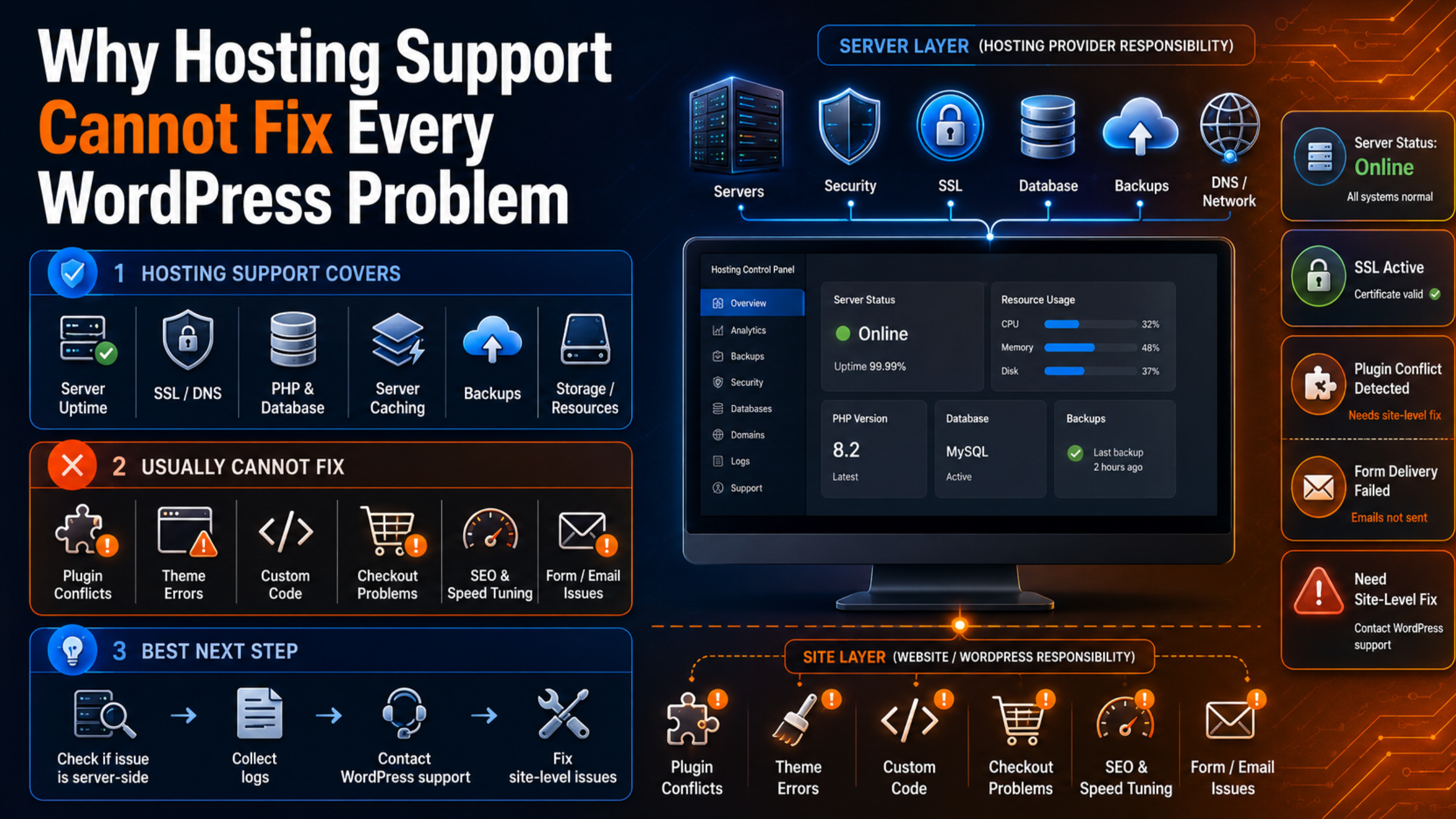
In practice, hosting support handles things like server uptime and hardware, PHP and database software versions, server-level caching, SSL certificate installation, DNS and domain pointing, and the resources your plan includes, such as memory and storage. On managed WordPress plans, the host may also run automatic core updates, daily backups, and malware scanning at the server level.
When the problem lives in this layer, hosting support is exactly who you want. If the server is down, overloaded, or misconfigured, they can fix it quickly because they control it.
Where hosting support draws the line
The line sits between the server and your website. Your host owns the server. You own the website that runs on it: the theme, the plugins, the content, the settings, and any custom code. Most hosting support will not cross that line, and often they are not allowed to.
There are good reasons for this boundary. Your site is your property, and a host changing your plugins or code without permission could break something or create a liability. Support teams also handle thousands of sites, so they cannot learn the details of each one. Their job is to keep the platform healthy, not to build or repair individual websites.
Even generous managed hosts have limits here. As one industry guide puts it plainly, managed hosting “can’t fix a bloated theme or bad code.” That is not a criticism of hosts. It is simply the scope of the service.
Common WordPress problems hosting support usually will not fix
Here are the issues that most often land back in your lap, even when your hosting includes support.
Plugin conflicts and crashes
When two plugins clash and take down a page, that is a site-level problem. A host may point out that a plugin is causing high load, but they will rarely dig in, test combinations, and resolve the conflict for you.
Theme errors and broken layouts
If a theme update breaks your design or hides content, the host will not rebuild your layout. Themes are part of your site, so fixing them is outside their scope.
Custom code and functionality
Snippets in your functions file, custom shortcodes, or bespoke features are yours to maintain. Hosting support will not debug or write custom code for your site.
WooCommerce and checkout problems
A broken cart or a failing payment gateway costs you sales, but it is a site and plugin issue. Hosts treat this as your responsibility, not theirs.
Design changes and content edits
Need a new landing page, a menu fix, or a layout tweak? That is website work, not server work. Hosting support does not make design or content changes.
SEO, speed tuning, and Core Web Vitals
Hosts provide fast infrastructure, but they will not optimize your images, clean up render-blocking scripts, or improve your on-page SEO. Those live inside your site.
Malware cleanup inside your files
Many hosts scan for malware and may suspend an infected site, but thorough cleanup, removing the malicious code and closing the entry point, is often left to you or a specialist. Some hosts charge extra for a one-time cleanup, if they offer it at all.
Restricted plugins and features
To protect performance, some managed hosts restrict certain plugins, such as heavy backup or caching tools, and do not support multisite networks. If your problem involves a restricted feature, support may simply decline.
Email and contact form delivery
When contact forms or order emails stop arriving, the cause is usually WordPress mail settings, not the server. Hosts rarely configure SMTP for your specific forms, so getting messages to deliver reliably is site-level work that falls to you or your support team.
Why this boundary exists
It helps to see the boundary as a feature, not a flaw. Hosting is priced for scale. A host keeps costs low by supporting the platform for everyone, not by doing custom work on each site. If every host fixed plugins and wrote code for free, hosting would cost far more.
There is also a safety angle. You would not want a support agent editing your live theme or database on a whim. Keeping site changes in your control, or in the hands of a support team you choose, protects your business from unwanted surprises. The boundary exists to keep responsibilities clear.
Managed versus shared hosting support
Not all hosting support is equal. Shared and budget hosting usually offers the narrowest help: keep the server running, and little more. Managed WordPress hosting tends to go further, with WordPress-savvy staff who can advise on plugin conflicts, caching, and update issues.
Even so, “advise” is the key word. A managed host may tell you which plugin is the likely culprit, but resolving the conflict, testing the fix, and making sure nothing else breaks is still site-level work. Managed hosting narrows the gap; it does not close it. If you want the full picture on how these services differ, see our guide on the signs your business needs professional WordPress support.
What to do when hosting support says “that is not us”
When you hit the wall, you have a few clear options. First, confirm the layer. Ask the host directly whether the issue is server-side or site-side. Their answer tells you who should handle it. Second, get the details they can share, such as error logs, resource usage, or the time the problem started. That information speeds up any fix.
Third, bring in help for the site layer. That means either doing the work yourself with a reliable guide, or hiring a dedicated WordPress support service that handles exactly the things hosts will not. If you are not sure how to start, our guide on how to get WordPress support walks through the choices.
How a dedicated support service fills the gap
A WordPress support service picks up right where hosting support stops. Instead of managing a server, the team works on your specific website. They fix plugin conflicts, repair themes, debug custom code, clean malware, tune speed, and make the edits you need. Most work with any host, so you keep your current hosting and add hands-on help on top.
The result is simple: no more finger-pointing. When one team is responsible for the site, problems get solved instead of bounced around. To understand what that kind of service typically includes, see our guide on what a WordPress support service includes, and for budgeting, how much WordPress support costs.
Some providers even combine both, offering support and hosting together so there is a single point of contact for the server and the site. That arrangement removes the boundary problem entirely, because one team owns both layers.
Frequently asked questions
Does managed hosting include full WordPress support?
Not usually. Managed hosting includes strong server support and some WordPress guidance, but it does not fix everything inside your site, such as plugin conflicts, design errors, or custom code. Always read the plan to see which issues are covered.
Why won’t my host fix my plugin problem?
Plugins are part of your website, not the server. Hosts keep the platform healthy but leave site-level work to you, both to respect your ownership and to keep support manageable across many customers.
Can I just switch to a better host to solve this?
A better host can improve speed, uptime, and the quality of advice, but it will not change the basic boundary. Site-level problems remain your responsibility no matter how good the host is.
Do I need both hosting support and a support service?
Often, yes. Hosting support keeps the server healthy, while a WordPress support service handles the website itself. Together they cover both layers, which is why many businesses use both.
Who fixes a hacked WordPress site, the host or a support service?
Hosts may detect malware and suspend the site, but full cleanup is frequently left to you or a specialist. A dedicated support service will remove the malicious code, restore a clean version, and harden the site against repeats.
Conclusion
Hosting support is valuable, but it was never meant to fix every WordPress problem. Your host keeps the server fast, secure, and online. Your website, the theme, plugins, content, and code, sits on top and belongs to you. When something breaks in that layer, hosting support will point you elsewhere, and that is by design.
Once you understand the boundary, the path forward is clear. Confirm whether the issue is server-side or site-side, gather the details, and bring in the right help for the site. Pair reliable hosting with a dedicated WordPress support service, and you will never be stuck between the two again. For official platform guidance, the WordPress.org hosting page and Learn WordPress are helpful references.

James is an experienced WordPress and WooCommerce specialist with over 10 years of practical experience. At WPChatSupport, he creates clear guides that help website owners fix WordPress issues, improve speed, secure their sites, and manage WooCommerce stores with confidence. His expertise includes store setup, plugin configuration, theme customization, payment gateway integration, and website troubleshooting. Through simple and helpful content, James supports users in solving technical problems and following best practices for online business growth.