Introduction
Search behavior is changing very fast. Users no longer depend only on search engines. They also use AI assistants to ask questions, compare services, and find trusted websites. Tools like ChatGPT, Gemini, Claude, Copilot, and other AI platforms now guide many online decisions. This shift matters for every business that depends on website traffic, leads, or sales.
Google Analytics AI Assistant tracking helps businesses understand this new user journey. It shows when visitors come from recognized AI assistant platforms. This makes reporting more useful for marketers, SEO teams, and business owners. Earlier, this traffic was harder to separate from other channels. Now, GA4 gives a clearer way to review AI-driven visits.
The GA4 AI Assistant channel helps businesses see how AI tools affect discovery. It also helps teams compare AI visits with Organic Search, Direct, Referral, Paid Search, and Social traffic. This guide explains the update in simple words. It also explains key metrics, SEO impact, and business use cases. With the right tracking, businesses can understand which pages attract AI users and which actions they take after landing on the website.
What Is Google Analytics AI Assistant Tracking and Why Does It Matter?
Google Analytics AI Assistant tracking is a feature in GA4. It helps identify website visits from recognized AI assistant platforms. These visits may happen when a user clicks a website link inside an AI-generated answer. For example, a user may ask ChatGPT for a reliable WordPress support company. ChatGPT may show a website link in the answer. If the user clicks that link, the visit may appear as AI Assistant traffic in Google Analytics.
This update is helpful because AI tools now influence many search journeys. A person may not search Google first. They may ask an AI assistant for advice. Then they may visit a website from the answer. That means AI assistants can become a new traffic source for websites.
Earlier, AI traffic tracking in GA4 was not always clear. Some AI traffic appeared as Referral traffic. Some visits appeared as Direct traffic. Some visits were difficult to understand without custom reports or manual filters. This made it hard to measure ChatGPT traffic in GA4 and other AI platform visits.
The new GA4 AI Assistant channel gives a better view of this traffic. It helps marketers see how many users came from AI assistants. It also helps them review behavior after the click. This includes sessions, engagement, landing pages, and conversions. These are important Google Analytics AI traffic metrics for any website.
What Changed in GA4 With the New AI Assistant Channel?
GA4 has added a new way to measure AI-driven traffic. This update helps website owners see visits from recognized AI assistants. Before this update, AI traffic tracking in GA4 was not very clear. Many visits from AI tools appeared under Referral or Direct traffic. This made reporting difficult for marketers and SEO teams.
The new GA4 AI Assistant channel makes this process easier. It helps separate AI Assistant traffic in Google Analytics from other channels. This means businesses can better understand how AI tools send users to their websites.
Earlier, many analytics teams used custom channel groups or regex filters. These methods helped track traffic from tools like ChatGPT, Claude, Gemini, and other AI platforms. But these setups were not easy for every user. They also required regular updates as new AI tools became popular.
Now, GA4 can classify recognized AI assistant visits automatically. When GA4 identifies a known AI assistant referrer, it can assign a new medium value. This value is called “ai-assistant.” This helps marketers understand the traffic source more clearly.
GA4 can also place these visits under the AI Assistant channel. This channel appears inside the Default Channel Group reports. It gives businesses a cleaner view of traffic from AI tools. It also helps compare AI Assistant traffic with Organic Search, Paid Search, Referral, Direct, and Social traffic.
Another change is the campaign value. GA4 may show “(ai-assistant)” as the campaign name for this traffic. This gives users another way to identify AI-driven sessions.
However, this update still depends on available referral data. If an AI platform does not pass referrer details, GA4 may not track it correctly. In that case, the visit may still appear under Direct or another channel. So, Google Analytics AI Assistant tracking is useful, but it may not show every AI-influenced visit.
Which AI Platforms Can Appear in AI Assistant Traffic Reports?
Several AI platforms may appear in AI Assistant traffic reports. These platforms can send users to a website when they show clickable links inside answers. Common examples include ChatGPT, Gemini, Claude, Deepseek, Copilot, Grok, and other recognized AI tools.
ChatGPT traffic in GA4 is one of the most important examples. Many users now ask ChatGPT for product ideas, service comparisons, and trusted website suggestions. If a user clicks a website link from ChatGPT, that visit may appear as AI Assistant traffic.
Gemini and Claude can also send users to websites. Copilot and Grok may also support discovery in different ways. The full list of recognized AI sources may change over time. Google can update its channel rules as AI platforms grow.
It is also important to understand one difference. Google AI Overviews and AI Mode are not the same as the AI Assistant channel. These are part of Google Search. Their traffic may appear under Organic Search, not AI Assistant traffic.
This difference matters for clear reporting. Businesses should not mix AI Assistant traffic with normal Google Search traffic. A clear channel view helps create better SEO, AEO, and GEO reports.
Where to Find AI Assistant Traffic in Google Analytics 4
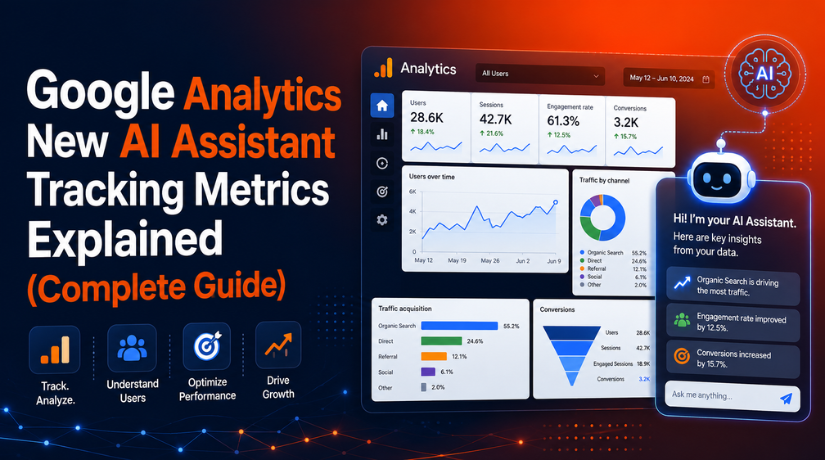
You can find AI Assistant traffic in Google Analytics 4 through the Traffic acquisition report. This report helps you see how users reach your website. It also helps you compare AI traffic with other channels.
Step 1: Open Your GA4 Property
- Log in to your Google Analytics account.
- Select the correct GA4 property for your website.
- Make sure you choose the right website before checking data.
- This helps you avoid reviewing the wrong traffic report.
Step 2: Go to the Reports Section
- Look at the left-side menu in GA4.
- Click on the Reports option.
- This section shows your main website performance reports.
- You can review traffic, users, engagement, and conversions here.
Step 3: Open the Acquisition Report
- Inside Reports, find the Acquisition section.
- Click on Acquisition to open traffic source reports.
- This area shows how visitors reach your website.
- It includes traffic from search, referral, direct, and paid sources.
Step 4: Click on Traffic Acquisition
- Now click on the Traffic acquisition report.
- This report shows traffic by different channel groups.
- You can review Organic Search, Direct, Referral, and Social traffic.
- You can also find the GA4 AI Assistant channel here.
Step 5: Check the Session Default Channel Group
- In the report table, check Session default channel group.
- Look for the AI Assistant channel in the list.
- If GA4 has recognized AI traffic, it may appear here.
- This helps you find AI Assistant traffic in Google Analytics.
Step 6: Use Session Source / Medium for More Details
- Change the report dimension to Session source / medium.
- This gives more details about the traffic source.
- You may find ChatGPT traffic in GA4 here.
- You may also see Gemini, Claude, or other AI sources.
Step 7: Review Important AI Traffic Metrics
- After finding AI Assistant traffic, review key metrics.
- Check users, sessions, engagement rate, and engagement time.
- Also review landing pages, key events, and conversions.
- These Google Analytics AI traffic metrics show traffic quality.
Step 8: Check Landing Pages and Conversions
- Review which pages receive AI Assistant traffic.
- These pages may be blogs, guides, or service pages.
- Check whether users submit forms, call, book, or buy.
- This helps measure the real value of AI traffic.
Step 9: Check the Report Every Month
- AI traffic may be low in the beginning.
- Check this report every month for better tracking.
- Compare AI Assistant traffic with Organic Search and Referral.
- Also review Direct traffic for possible missing AI source data.
Some websites may not see AI Assistant traffic right away. This can happen because of low traffic, missing referral data, or no recognized AI assistant visits yet.
Google Analytics’ New AI Assistant Traffic Tracking Metrics Explained
Google Analytics AI traffic metrics help you understand visitor quality. They do not only show how many people arrived. They also show what users did after reaching your website. This is important because AI Assistant traffic in Google Analytics may grow slowly at first. Still, these visitors can have strong intent. They may already trust the answer before clicking your link. That makes their behavior worth tracking closely.
Users: Users show how many unique people came from AI assistants. This helps you understand your AI-driven reach. For example, ChatGPT traffic in GA4 may bring fewer users than Organic Search. Still, those users may spend more time on your website. So, always compare users from the GA4 AI Assistant channel with other channels.
Sessions: Sessions show total visits from AI Assistant traffic. One user can visit your website more than once. This means sessions can be higher than users. Sessions help you understand how often AI users visit your website. It also shows whether AI tools are creating repeat interest.
Engaged Sessions: Engaged sessions show meaningful visits. These users may stay longer, view more pages, or complete actions. This metric is better than only checking visits. It helps you see if AI visitors actually find your content useful.
Engagement Rate: Engagement rate shows the percentage of useful sessions. A high engagement rate means visitors are not leaving quickly. It also shows that your page matches their needs. This is one of the most helpful Google Analytics AI traffic metrics.
Average Engagement Time: Average engagement time shows how long users stay active. If AI visitors spend more time, your content may be helpful. If they leave quickly, your page may need better answers, headings, and calls to action.
Landing Pages: Landing pages show where AI users enter your website. These pages may be blogs, service pages, guides, or product pages. Review these pages carefully. Improve them with clear answers, updated facts, and helpful internal links.
Key Events: Key events show important user actions. These may include form fills, phone clicks, purchases, downloads, or quote requests. Tracking key events helps you understand if AI traffic brings real business value.
Conversion Rate: Conversion rate shows how many visitors complete goals. This helps you measure real results from AI traffic tracking in GA4. Even low AI traffic can be valuable if users contact, book, or buy.
Revenue or Lead Value: Revenue is important for ecommerce websites. Lead value is important for service businesses. Connect GA4 with CRM, call tracking, or sales reports. This helps you understand the full value of AI-driven visitors.
What This GA4 AI Assistant Channel Means for SEO, AEO, and GEO
The new GA4 AI Assistant channel changes how businesses view online visibility. Earlier, most teams focused on search engines, ads, social media, and referral websites. Now, AI assistants are also part of the discovery journey. Users may ask an AI tool for help before visiting a website. This makes Google Analytics AI Assistant tracking important for modern SEO reports.
SEO: Search Engine Optimization helps your website appear in search results. It focuses on useful content, keywords, technical health, links, and user experience. AI Assistant traffic in Google Analytics gives SEO teams another signal. It shows whether AI tools are sending users to your content.
AEO: Answer Engine Optimization focuses on clear answers. Many users ask direct questions in AI tools. Your content should answer those questions in a simple way. Use clear headings, short answers, examples, and helpful details. This can make your content easier to understand for users and AI systems.
GEO: Generative Engine Optimization helps AI systems understand your content better. It focuses on trust, clarity, structure, and expert value. Content should include updated facts, expert insight, clear service details, and strong internal links. This can support better visibility in AI-driven discovery.
Google Analytics AI traffic metrics help you find useful pages. If AI assistants send users to a blog or service page, review that page carefully. It may already match user intent well. Improve it with stronger headings, better calls to action, and updated information. This can help both users and search engines.
How Businesses Should Use AI Assistant Traffic Data
Businesses should not only collect AI traffic data. They should use it to improve decisions. AI traffic tracking in GA4 can show which pages attract users from AI tools. It can also show whether those users engage, convert, or leave quickly.
Review Top AI Landing Pages
Check which pages receive AI Assistant traffic. These pages may include blogs, guides, service pages, or product pages. Improve them with clear answers, simple language, updated facts, and useful internal links.
Compare AI Traffic With Organic Search
Compare users, sessions, engagement rate, and conversions. This helps you understand traffic quality. ChatGPT traffic in GA4 may be lower than Organic Search. Still, it can be valuable if users take action.
Track Key Events and Conversions
Do not only check visits. Track form fills, phone clicks, bookings, quote requests, downloads, purchases, and sign-ups. These actions show real business value from AI Assistant traffic.
Improve Content for AI Discovery
Create content that answers real user questions. Add definitions, examples, comparison points, and expert tips. Keep content fresh and easy to read. This supports SEO, AEO, and GEO together.
Build Better Monthly Reports
Add AI Assistant traffic as a separate report section. Include users, sessions, engagement rate, landing pages, key events, conversion rate, and revenue. This helps clients and teams understand AI traffic clearly.
Connect GA4 With Business Data
Service businesses should connect GA4 with CRM or call tracking. Ecommerce websites should check revenue from AI traffic. This gives a better view of lead quality and sales value.
Conclusion
Google Analytics AI Assistant tracking is now important for marketers, SEO teams, and business owners. It helps show how AI tools send users to your website. The GA4 AI Assistant channel also makes reporting clearer and easier.
Businesses should review users, sessions, landing pages, engagement, key events, conversions, and revenue. These Google Analytics AI traffic metrics show the true value of AI-driven visitors. However, not every AI visit may appear perfectly in reports. Some traffic may still appear as Direct or Referral.
The best approach is simple. Review AI Assistant traffic every month. Improve top landing pages. Track important actions. Compare AI visitors with organic users. Use this data to strengthen SEO, AEO, GEO, and overall business growth.

James is an experienced WordPress and WooCommerce specialist with over 10 years of practical experience. At WPChatSupport, he creates clear guides that help website owners fix WordPress issues, improve speed, secure their sites, and manage WooCommerce stores with confidence. His expertise includes store setup, plugin configuration, theme customization, payment gateway integration, and website troubleshooting. Through simple and helpful content, James supports users in solving technical problems and following best practices for online business growth.