Introduction: Why WordPress.com and WordPress.org Confuse So Many People
Two websites share almost the same name. One is WordPress.com. The other is WordPress.org. Both let you build a site with WordPress. Both are run by people close to the project. Yet they work in very different ways, and picking the wrong one costs you time and money.
The confusion is easy to explain. WordPress is free open source software. WordPress.org is the home of that software and the place you download it. WordPress.com is a commercial hosting service built on top of the same software. It is run by Automattic, a company started by one of the original WordPress developers.
So the question is not really which software is better. It is the same software either way. The real question is who runs the server, who does the maintenance, and how much control you want. This guide compares both sides in plain words. We look at hosting, cost, plugins, design, security, money and support. By the end you will know which one fits your site.
WordPress.com vs WordPress.org: The Short Answer
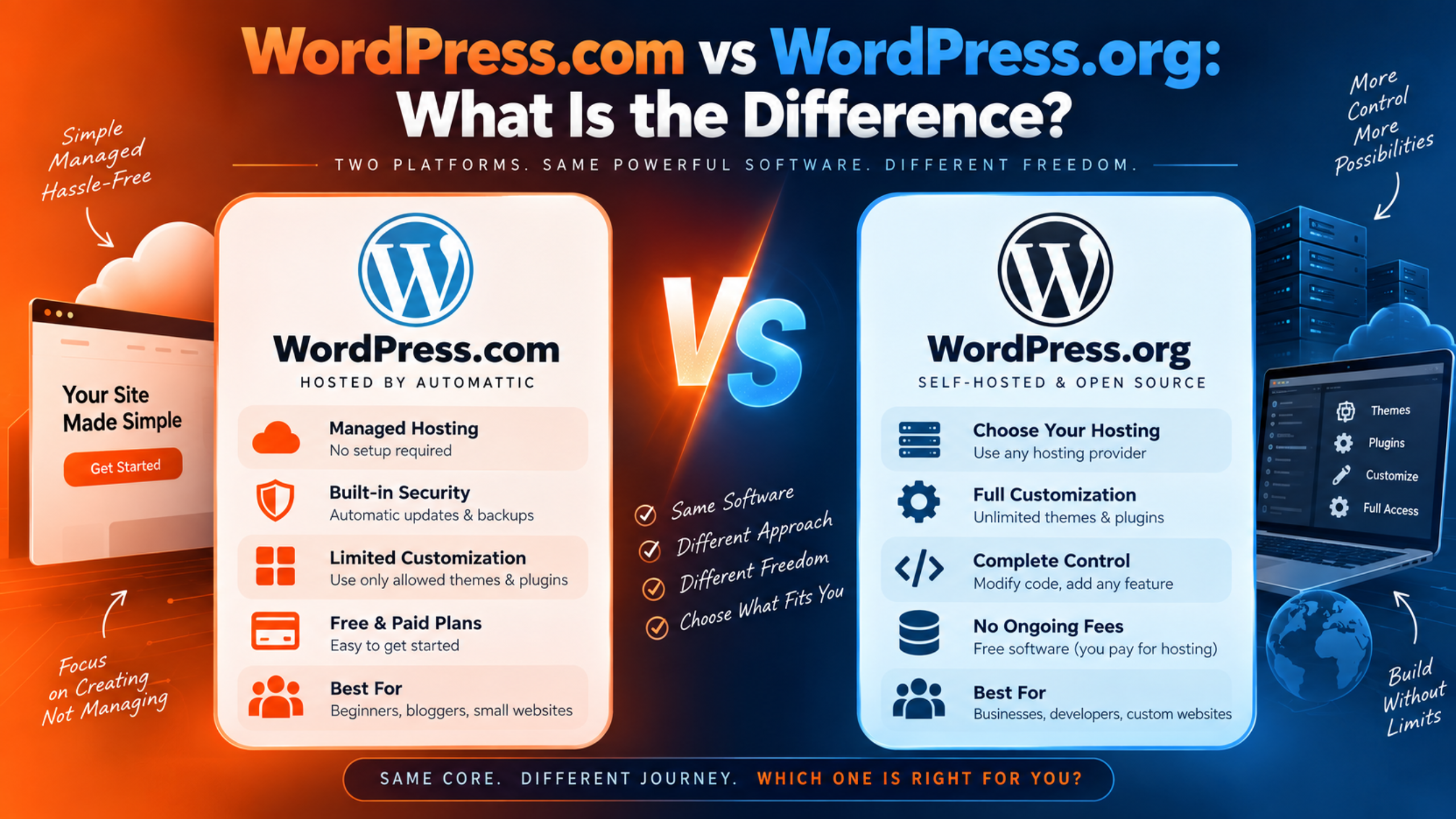
The main difference is hosting. WordPress.com includes it. WordPress.org does not.
With WordPress.com you sign up, pick a plan, and start building. The server, the updates, the backups and the security are handled for you. You never touch a control panel or a PHP setting. Automattic states this plainly in its own guide on the difference between the two.
With WordPress.org you download the software for free. Then you rent hosting from a company you choose. You install WordPress there, or your host installs it for you. After that the site is yours to run. That means full freedom and full responsibility at the same time.
People often call the second route self-hosted WordPress. That name is the clearest way to think about it. One path is a managed service. The other is a build-it-yourself project with no ceiling on what you can do.
What Is WordPress.com?
WordPress.com is a website builder and host in one package. You create an account and your site exists within minutes. There is no software to download and nothing to upload. The hosting sits underneath everything you do.
Automattic offers several tiers. There is a free plan, then Personal, Premium, Business and Commerce. Large organisations can use an Enterprise option. Each step up adds storage, features and support. The current details live on the WordPress.com pricing page, and they do change.
The free plan is a real starting point, not a trial. It does have limits worth knowing. WordPress.com shows its own ads to visitors on free sites, and moving to the Personal plan turns those off. Paid plans also include a custom domain free for the first year.
The trade is straightforward. You give up some low-level control. In return you never think about server updates, SSL certificates or malware scans. For many site owners that is a very good deal.
What Is WordPress.org?
WordPress.org is the home of the open source project. It is where the software is built, documented and downloaded. The download costs nothing and always will. Thousands of independent contributors around the world maintain it.
Downloading it is only the first step. The software has to run somewhere. So you rent hosting, point a domain at it, and install WordPress on that server. Most hosts now offer a one-click installer, so the technical bar is lower than it used to be.
From there, everything is yours to decide. You choose the host and the plan. You choose the PHP version. You install any plugin or theme from anywhere. You can edit the code itself if you want to.
The flip side is that the work is yours too. Updates, backups, security and speed all sit with you or with someone you hire. Nobody checks on your site unless you arrange it. That is the real cost of self-hosting, and it is paid in attention rather than cash.
WordPress.com vs WordPress.org: A Feature by Feature Comparison
Here is how the two compare on the things that actually affect your day. Each section covers one decision point.
Hosting and Setup
WordPress.com includes managed hosting in every plan. Your site is live as soon as you create it. There is no server to pick and no software to install. Automattic describes this as an all-in-one builder and host.
WordPress.org needs you to arrange hosting yourself. You compare providers, pick a plan, and pay for it separately. Then you install WordPress or use your host’s installer. You also handle the domain and point it at the server.
The gap here is time and confidence, not difficulty. A WordPress.com site can be up in ten minutes with no research. A self-hosted site usually takes an evening once you count host research and setup. Many people practise the whole process first on their own computer. Our guide to installing WordPress on XAMPP locally shows how to do that for free.
Cost and Ongoing Fees
Neither option is simply cheaper. They just bill differently. WordPress.com charges one fee that covers hosting, security, backups and support. The free plan costs nothing at all, and paid plans rise in clear steps.
WordPress.org has no software fee ever. Your costs are hosting, a domain, and anything you add on top. Premium themes and plugins are often sold as yearly licences. Those small fees add up quickly on a busy site.
Automattic makes one fair point about comparing prices. Many hosts advertise a low introductory rate that only lasts one billing cycle. The renewal price can be double or triple that figure. So compare renewal prices, not headline prices, whichever route you pick.
There is a hidden cost on the self-hosted side too. Somebody has to run the site. If that is not you, it is a maintenance plan or an agency. Our breakdown of how much WordPress support costs gives realistic figures for that.
Plugins and Themes
This area has changed, and a lot of old advice is now wrong. Plugins used to need the Business plan on WordPress.com. Today Automattic states that plugins can be installed on any paid plan. That includes Personal, Premium, Business and Commerce.
WordPress.com gives access to a very large plugin marketplace, and you can upload a plugin directly. Plugin updates are handled for you. Automattic also blocks plugins it considers risky, which protects the platform but removes a little choice.
WordPress.org has no restrictions at all. Any plugin, any theme, any source. You can write your own and install it in seconds. Nothing is blocked and nothing is screened, so quality control is your job.
Themes follow the same pattern. WordPress.com ships a large set of supported themes, and eligible plans allow custom themes. Self-hosted sites accept any theme from anywhere. If you want to build a theme from scratch, self-hosted is the natural home for that.
Design and Technical Control
Both options use the same WordPress editor. So the day-to-day writing and layout experience feels alike. The difference sits underneath the editor.
On WordPress.com the server setup is managed. You cannot change the PHP environment on lower plans. Higher tiers open up developer tools, including SFTP and SSH access, WP-CLI and GitHub deployments. Automattic lists those on its Business and Commerce plans.
On WordPress.org nothing is off limits. You can change PHP versions, edit server settings and add custom code anywhere. You can run any caching setup you like. You can also break the site completely, which is the honest trade-off.
Ask yourself one question here. Does your project need custom code at the server level? If the answer is no, managed hosting removes work you never wanted. If the answer is yes, self-hosting is the safer long-term choice.
Security, Backups and Updates
WordPress.com handles this for you. Automattic says updates, backups and the domain SSL certificate are all automatic. Business and Commerce plans add real-time backups with one-click restores. You do not schedule anything or check anything.
WordPress.org leaves it entirely to you. Core updates can run automatically, but plugins, themes and PHP versions need attention. Backups depend on your host or a plugin you install. Security depends on your own choices.
This is where most self-hosted sites get into trouble. An outdated plugin is the classic way a WordPress site is broken into. A site without a tested backup has no way back from that. Neither problem is hard to avoid, but both need a routine.
If you self-host, set that routine up on day one. Install a backup plugin and confirm a restore actually works. Our guide on backing up WordPress with UpdraftPlus walks through it. Then decide who applies updates every month, and put it in a calendar.
Making Money From Your Site
Both routes let you earn from your site, but the ceiling differs. WordPress.com paid plans include payment buttons for PayPal and Stripe. That covers donations, simple products and paid subscriptions well.
A full online store is a bigger job. WordPress.com puts that on its Commerce plan, which is built around WooCommerce. It includes store themes and support for selling in many countries.
On WordPress.org you can install WooCommerce on any host that can handle it. You pick your own payment gateways, shipping plugins and tax tools. There is no platform rule about what you may sell or how.
Advertising is worth a separate mention. Free WordPress.com sites show WordPress.com’s own ads, and you do not earn from them. Paid plans remove those ads. On a self-hosted site you control every ad slot from the start.
Support When Something Goes Wrong
This is the difference people feel most at three in the morning. WordPress.com has a support team, known as Happiness Engineers. Automattic says support is available on paid plans, with 24/7 priority support on the Business and Commerce tiers. There is one company to contact and one place to go.
WordPress.org has no dedicated support team at all. It offers volunteer-run community forums. Your host supports the server, and each plugin author supports their own plugin. So a single problem can involve three separate parties.
That gap is not a reason to avoid self-hosting. It just means you need a plan for bad days. Many site owners fill it with a maintenance retainer or an agency on call. Others learn enough to handle the common failures themselves.
We cover this split in detail in our comparison of WordPress.com vs WordPress.org support. If you want to know what a paid support service actually covers, read what a WordPress support service includes.
Ownership and Moving Your Site
Ownership worries a lot of people, and the answer is reassuring. Automattic states that you own your content on both platforms. You are free to move it whenever you want. That applies to the free plan too.
WordPress.com provides an export tool for your content. WordPress.com also offers migration tools for bringing a site in from elsewhere. So the door opens in both directions.
There is still a practical difference. A self-hosted site gives you the database and the files as well. That is a complete copy of everything, not just your posts and pages. Custom server settings and some plugin data do not travel between platforms.
Plan for the move you are most likely to make. Many sites start on WordPress.com and move to self-hosted as they grow. That path is well worn and works fine. Just expect to rebuild a few plugin-driven features along the way.
How to Tell Which One Your Site Already Uses
Plenty of people inherit a site and cannot tell which platform it is on. There are three quick ways to find out.
Look at your billing first. If you pay Automattic or WordPress.com, the site is on WordPress.com. If you pay a hosting company such as a shared or managed host, it is self-hosted. That single check settles most cases.
Next look at where you log in. WordPress.com sites usually send you to a wordpress.com address to sign in. Self-hosted sites use your own domain followed by wp-admin. Some WordPress.com plans also show the familiar dashboard, so check the address bar rather than the design.
Automattic also offers a tool for this. Its Site Profiler takes any web address and reports where the site is hosted. That is the fastest option when the site is not yours. It also tells you where the domain is registered.
Which One Should You Choose?
There is no single right answer. There is only a right answer for your site. These two lists make the choice concrete.
Choose WordPress.com If This Sounds Like You
You want a site online today without learning about servers. You would rather pay one predictable fee than manage several. You do not want to think about updates, backups or malware. You value having one company to contact when something breaks.
It also suits simple site types very well. Blogs, portfolios, newsletters and small business brochure sites all fit comfortably. A small shop fits on the Commerce plan. If your list of must-have features is short, managed hosting saves you real hours every month.
One more group belongs here. People who tried self-hosting and hated the upkeep. Moving to managed hosting is not a step backwards. It is a decision about where your time is best spent.
Choose WordPress.org If This Sounds Like You
You need a specific plugin or a custom-built feature. You want control over the PHP version and server settings. You plan to grow into something complex, such as a membership site or a large store. You are comfortable owning updates and backups, or paying someone to own them.
Agencies and developers almost always sit here. So do businesses with a real development budget. The freedom matters when a client asks for something unusual. Nothing on the platform can tell you no.
Be honest about the maintenance before you commit. A self-hosted site needs regular attention to stay healthy. If nobody in your business will do it, arrange support before you launch rather than after. Our comparison of managed WordPress hosting versus a support service explains how those two options differ.
Can You Switch Between WordPress.com and WordPress.org?
Yes, and people do it in both directions. Automattic confirms that any WordPress site can be migrated to or from WordPress.com. Your content is never locked in.
Moving from WordPress.com to self-hosted is the common path. You export your content, buy hosting, install WordPress and import the file. Then you point your domain at the new server. Set up backups and security before you announce the move.
Moving the other way is just as possible. WordPress.com offers migration tools that pull an existing WordPress site in. People usually do this when maintenance has become a burden. The site stays the same and the upkeep disappears.
A few things never transfer cleanly either way. Custom server settings do not travel. Some plugin data needs to be rebuilt. Redirects and SEO settings need checking afterwards. Plan a quiet week for the switch and test every important page once it is done.
Frequently Asked Questions
Is WordPress.org Actually Free?
The software is free and always has been. You can download it, use it and change it at no cost. What you pay for is everything around it. Hosting, a domain name and any premium plugins or themes are your own expenses. So the software is free, but running a site is not.
Which One Is Better for SEO?
Both run the same WordPress software, so the foundation is identical. Both can produce fast, well-structured pages. Self-hosting gives you more room to tune things, because you can install any SEO plugin and control the server. On WordPress.com, plugins are available on paid plans, which covers most needs. Your content and your site speed matter far more than the platform.
Can I Use My Own Domain Name on WordPress.com?
Yes, on any paid plan. Automattic includes a custom domain free for the first year on those plans. You can also connect a domain you already own elsewhere. Free plans use a wordpress.com subdomain instead. That looks less professional for a business site.
Does WordPress.com Put Ads on My Site?
On the free plan, yes. WordPress.com displays its own ads to your visitors, and you do not earn from them. Upgrading to the Personal plan removes them. Every paid plan is ad-free by default. You can still run your own advertising if your plan allows the tools for it.
Do I Need a Developer to Use WordPress.org?
Not to get started. Most hosts install WordPress for you in a few clicks. Writing posts and building pages needs no code at all. You are more likely to need help with maintenance and with problems later on. Many small businesses use a support plan for exactly that reason.
Where Do I Get Help if Something Breaks?
It depends on the platform. WordPress.com users contact the support team through their account, and paid plans include that help. Self-hosted users start with their host for server issues and the plugin author for plugin issues. The WordPress.org community forums are free but staffed by volunteers. Our guide on whether WordPress.org offers customer support explains what to expect there.
Conclusion
WordPress.com and WordPress.org run the same software. The difference is who handles the hosting and the upkeep. WordPress.com bundles hosting, security, backups and support into one plan. WordPress.org hands you free software and leaves the rest to you.
That single difference shapes everything else. It decides how you pay, how much you can customise, and who fixes things at midnight. Plugins are no longer the deciding factor, because paid WordPress.com plans now allow them. Control and responsibility are the real dividing line.
Choose WordPress.com when you want to write and publish without managing a server. Choose WordPress.org when you need full control, custom code or unusual features. Both let you keep ownership of your content, and both let you move later if you change your mind.
Whichever you pick, plan for the bad day before it arrives. Know where your backups are and know who you will contact. That preparation matters far more than the platform on your invoice.

James is an experienced WordPress and WooCommerce specialist with over 10 years of practical experience. At WPChatSupport, he creates clear guides that help website owners fix WordPress issues, improve speed, secure their sites, and manage WooCommerce stores with confidence. His expertise includes store setup, plugin configuration, theme customization, payment gateway integration, and website troubleshooting. Through simple and helpful content, James supports users in solving technical problems and following best practices for online business growth.