Your WooCommerce store is more than a website. It takes payments, holds customer data, and drives your revenue. So when something breaks, you lose sales, not just page views. That is why a WooCommerce store needs more care than a simple blog or brochure site.
This guide explains what WordPress support for WooCommerce stores actually includes. You will learn the tasks a good support plan covers, why each one matters, and how to pick the right level of help for your store. By the end, you will know exactly what you should expect to pay for.
Why WooCommerce stores need dedicated support
A standard WordPress site shows content. A WooCommerce store runs a business. It processes orders, manages stock, calculates tax, and stores personal details. Each of those functions relies on extra plugins, payment gateways, and database tables.
More moving parts means more things can fail. A plugin update can break your checkout. A slow server can lose a sale at the payment step. A security gap can expose customer data. On a busy store, even ten minutes of downtime can cost real money.
General WordPress support covers the basics. WooCommerce support goes further. It watches the parts that make you money, like the cart, the checkout, and the payment gateway. If you want to compare general and store-specific help, our guide on what a WordPress support service includes is a good starting point.
What WordPress support for WooCommerce stores includes
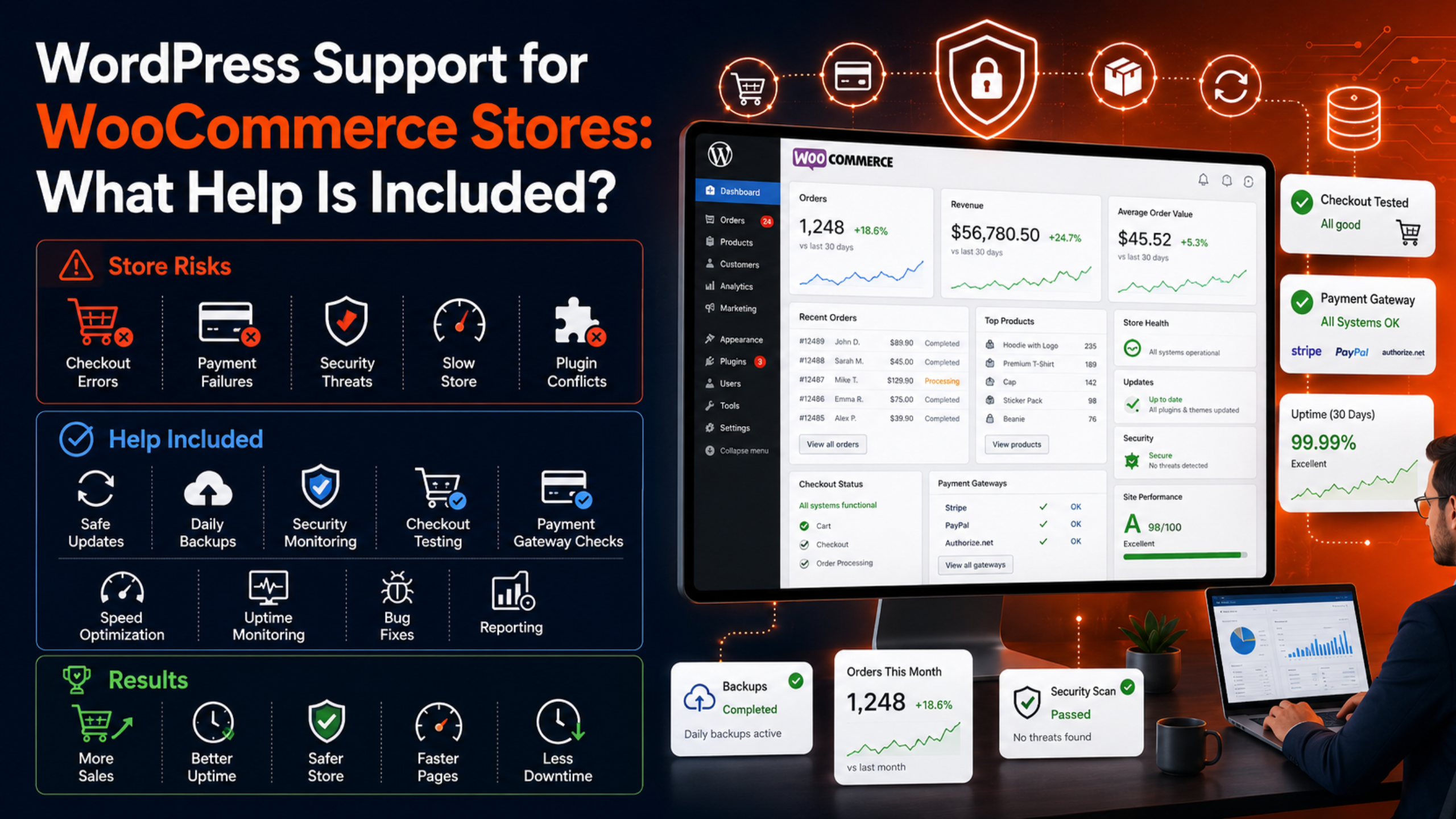
A complete WooCommerce support plan covers eight core areas. Some plans bundle all of them. Others charge for extras. Always check the scope before you sign up.
1. Safe updates for core, themes, and plugins
WooCommerce, WordPress core, your theme, and your extensions all release updates. These patches fix bugs and close security holes. But a bad update can break your store, so you should never apply them blindly.
A support team updates in the right order. They test changes on a staging copy first. Then they push updates to your live store and confirm the checkout still works. This controlled process follows the same care that WordPress.org recommends for updates, and it keeps your store current without surprise crashes.
2. Daily backups and fast restores
Backups are your safety net. If an update fails or a hack hits, a recent backup lets you roll back in minutes. For a store, backups must include the database, because that is where your orders and customer records live.
Good plans run automated daily backups and store them off-site. Some run more often during busy sales periods. They also test restores, because a backup you cannot restore is worthless. Learn more on our WordPress backup and recovery page.
3. Security monitoring and malware cleanup
Online stores are prime targets. Attackers want card data, login details, and customer emails. A single breach can trigger fraud, fines, and lost trust.
WooCommerce support includes security scans, a firewall, and login protection. The team watches for malware and suspicious activity. If they find an infection, they clean it and close the gap that let it in. Strong WordPress security is not optional for a store that handles payments.
4. Checkout and payment gateway testing
Your checkout is the most important page on your site. If it fails, you lose the sale at the last step. Yet checkout problems are easy to miss, because you rarely test your own buying flow.
Support teams run test orders on a schedule. They confirm the cart, shipping, tax, and payment steps all work, in line with the official WooCommerce documentation. They also test each payment gateway, such as Stripe or PayPal. If a customer ever sees an error, our guide to fixing the “there was an error processing your order” message in WooCommerce walks through the common causes.
5. Performance and speed tuning
Speed sells. Shoppers leave slow stores, and Google ranks fast pages higher. WooCommerce sites often slow down because they carry many plugins, large product images, and heavy database queries.
Support includes caching, image optimization, and database cleanup. The team removes bloat, tunes the server, and keeps your product pages quick. Faster pages mean more completed checkouts and better search rankings.
6. Uptime monitoring
You cannot fix a problem you do not know about. Uptime monitoring checks your store every few minutes. If it goes down, the team gets an alert right away, often before your customers notice.
This matters most during sales, product launches, and holiday rushes. Fast alerts mean fast fixes. Instead of losing hours of sales, you lose minutes.
7. Bug fixes and error resolution
Stores break in many ways. A broken product image, a failed order email, a stuck coupon, or a plugin conflict can all hurt sales. These issues need quick, expert fixes.
Support plans include a set number of small fixes each month. The team diagnoses the cause and resolves it, rather than guessing. For urgent outages, a plan with 24/7 WooCommerce emergency support gets help fast at any hour.
8. Reporting and clear communication
You should know what your support team does. Good plans send a monthly report. It lists updates applied, backups taken, threats blocked, and fixes made.
Clear reports build trust. They also help you spot patterns, like a plugin that keeps causing trouble. Ask for a sample report before you commit to any provider.
What is usually not included
Support plans keep your store running. They do not usually include big new features. Custom development, a full redesign, or a new checkout flow are separate projects.
Content work is often extra too. Writing product descriptions, adding hundreds of products, or building marketing campaigns fall outside standard support. Some providers offer these as add-ons, so ask what is inside your plan and what costs more.
How to choose the right WooCommerce support plan
The right plan depends on your store size, traffic, and revenue. A small store with a few products needs less than a busy store with thousands of orders. Use these steps to decide.
Step 1: List your store’s risks
Think about what would hurt most. Is it downtime during a sale? A checkout failure? A security breach? Rank your risks, then match a plan that covers the top ones.
Step 2: Check response times
Ask how fast the team replies and fixes issues. For a store, a same-day or faster response matters. If you run promotions or sell around the clock, look for round-the-clock coverage.
Step 3: Confirm backups and security are included
These two are non-negotiable for a store. Make sure daily backups and active security monitoring are in the base plan, not costly add-ons.
Step 4: Compare price against risk
Cheap plans may skip key tasks. Expensive plans may include more than you need. Weigh the cost against what one hour of downtime would cost your store. To set a budget, read our breakdown of how much WordPress support costs.
Step 5: Read the reports and reviews
Look for providers who share sample reports and honest reviews. A team that documents its work is a team you can trust with your revenue.
If you sell to other businesses rather than direct shoppers, your needs shift toward lead capture and integrations. Our guide to WordPress support for B2B websites covers that case in detail.
Signs your store needs professional support now
Some stores can wait. Others need help today. Watch for these warning signs:
- Your checkout fails or throws errors for customers.
- Your store loads slowly, especially on product pages.
- You have not updated plugins in months because you fear a crash.
- You have no recent, tested backup.
- You spend hours fixing issues instead of selling.
If two or more of these sound familiar, professional support will pay for itself. The dedicated WooCommerce support service from WP Chat Support covers every task listed above, so your store stays open and fast.
How support protects your busiest sales days
Your store earns the most during sales, launches, and holiday rushes. Traffic spikes, orders climb, and the pressure on your site grows. That is also when problems cost the most. A crash on Black Friday hurts far more than one on a quiet Tuesday.
Good support prepares for these peaks. Before a big event, the team checks your server limits, tests the checkout, and confirms your backups are fresh. During the event, uptime monitoring watches the store closely. If traffic strains the server, the team acts fast to keep pages loading.
This planning turns your busiest days into your best days. Instead of firefighting, you focus on sales and customers. The store handles the load, the checkout stays smooth, and no order is lost to a preventable error. That peace of mind is a core reason store owners choose professional support over doing everything alone.
Frequently asked questions
Is WooCommerce support different from WordPress support?
Yes. WordPress support keeps the site healthy. WooCommerce support adds store-specific tasks, like checkout testing, payment gateway checks, and order-email fixes. A store needs both.
How often should a WooCommerce store be backed up?
At least once a day. Busy stores should back up more often, because every hour brings new orders. The backup must include the database, where orders and customer data are stored.
Can I maintain my WooCommerce store myself?
You can handle small stores with time and skill. But updates, security, and checkout testing take real effort. Most owners find professional support frees them to focus on selling.
Will support stop my store from ever going down?
No plan can promise zero downtime. But monitoring, backups, and fast fixes keep outages short and rare. The goal is minutes of downtime, not hours.
Does support include adding new products or features?
Usually not. Standard support keeps your store running. Adding products, building features, or redesigning the store are separate projects, though many providers offer them as add-ons.
Conclusion
WordPress support for a WooCommerce store is not a luxury. It protects the systems that take your money and hold your customer data. A complete plan covers safe updates, daily backups, security, checkout testing, speed, uptime monitoring, quick fixes, and clear reports.
Match the plan to your store’s size and risk. Insist on backups and security in the base package. Then check response times and read the reports. With the right support, your store stays fast, safe, and open for business. If you are ready to protect your revenue, explore the WooCommerce support plans and get expert help before the next issue costs you a sale.

James is an experienced WordPress and WooCommerce specialist with over 10 years of practical experience. At WPChatSupport, he creates clear guides that help website owners fix WordPress issues, improve speed, secure their sites, and manage WooCommerce stores with confidence. His expertise includes store setup, plugin configuration, theme customization, payment gateway integration, and website troubleshooting. Through simple and helpful content, James supports users in solving technical problems and following best practices for online business growth.