Websites do not keep office hours. A plugin can fail at 2 a.m., a hacker can strike on a holiday, and a checkout can break during your busiest weekend. That is why many site owners look for 24/7 WordPress support. But the phrase means different things to different providers. Some offer a real team on call at all hours. Others just leave a contact form open overnight.
Before you pay for any plan, you need to know what a strong one should include. This guide breaks down the features that matter, the questions to ask, and how to tell real round-the-clock coverage from an empty promise. By the end, you will be able to compare plans with confidence and pick one that truly protects your site.
What “24/7 WordPress Support” Really Means
At its simplest, 24/7 support means you can reach help at any hour, any day. But real value comes from what happens after you reach out. A good plan does not just answer the phone. It watches your site, fixes problems fast, and often catches trouble before you even notice.
Think of it as two layers. The first layer is reactive: when something breaks, someone is ready to help. This links closely to emergency WordPress support, which handles urgent outages. The second layer is proactive: the provider monitors, updates, and hardens your site so fewer emergencies happen at all. The best plans blend both. Weak plans only offer the first, and often slowly.
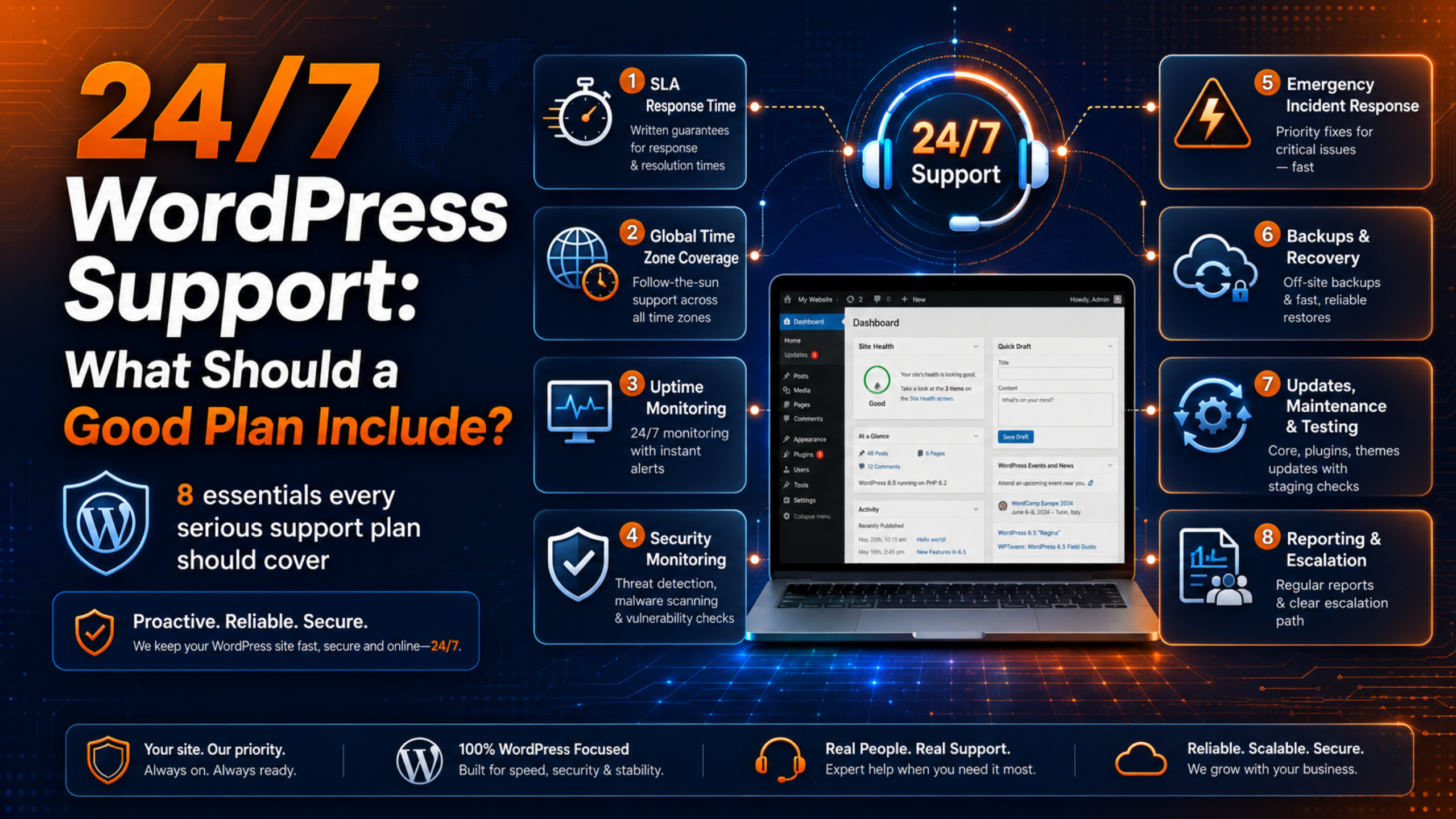
8 Things a Good 24/7 Support Plan Should Include
Use this list as a checklist when you compare providers. Each item marks the difference between a plan that reassures you and one that only sounds good on paper.
1. Guaranteed Response Times in Writing
A promise of “fast help” means nothing without numbers. Look for a written Service Level Agreement, or SLA. It should state how quickly the team replies and how quickly they aim to resolve an issue. Premium providers often promise a first response within 15 to 60 minutes for emergencies. The key word is written. A guarantee you can point to is far stronger than a friendly hope.
2. Real Coverage Across Every Time Zone
Ask how the provider staffs the night shift. True 24/7 support uses teams spread across time zones or a dedicated on-call rotation. Avoid providers who simply log tickets overnight and reply the next morning. That is not 24/7 support. That is a next-business-day service with a bold label.
3. Uptime and Security Monitoring
Good plans watch your site so you do not have to. Uptime monitoring pings your site every few minutes and alerts the team the moment it drops. Security monitoring scans for malware, suspicious logins, and known plugin flaws. Many providers aim for a high uptime target, such as 99.9 percent, and back it with active checks. This early warning turns many crises into quiet, quick fixes.
4. Fast Emergency Incident Response
When your site goes down, the plan should trigger a clear response, not a slow queue. Priority handling for outages, malware, and checkout failures separates a serious plan from a basic one. The team should be able to access your backups, roll back a bad change, and restore service quickly. If you run a store, downtime is lost revenue, so speed here pays for itself.
5. Backups and Reliable Recovery
Backups are your last line of defense. A strong plan runs automatic backups, stores them off-site, and tests that they actually restore. Ask how often backups run and how far back you can roll. Daily backups are a sensible baseline, and high-traffic stores may need more. The official notes on WordPress backups explain why they matter. Recovery should be a click for the team, not a scramble.
6. Updates, Maintenance, and Testing
Most emergencies start with a bad update. A good plan applies core, plugin, and theme updates carefully, ideally on a staging copy first, following the official update guidance. This is where the line between maintenance and support blurs, and our guide on WordPress maintenance versus support explains the difference. The strongest plans include both, so your site stays current and stable.
7. Clear Scope and an Escalation Path
Every plan has limits. A trustworthy provider states them up front. The plan should define what counts as an incident, which tasks are included, and what falls outside the fee. It should also name an escalation path, so a tough problem reaches a senior expert instead of stalling. Clear scope prevents nasty surprises when you need help most.
8. Transparent Reporting
You should be able to see the value you pay for. Look for regular reports that list updates applied, threats blocked, backups taken, and uptime percentage. Monthly reporting keeps the provider accountable and gives you a record of your site’s health. If a provider cannot show you what they did, it is hard to trust what they claim.
Questions to Ask Before You Sign Up
A short conversation reveals a lot. Before you commit, ask these questions and listen for clear, specific answers.
What is your guaranteed response time for an emergency, and is it in writing? Who handles support at 3 a.m., and where are they based? How often do you back up my site, and how fast can you restore it? What is included in the fee, and what costs extra? How will you report on the work you do each month? Do you test updates on a staging site before they go live? Vague answers are a warning sign. Confident, detailed answers point to a team that has handled real emergencies.
It also helps to understand pricing before you compare. Our breakdown of how much WordPress support costs shows the common models, and the WP Chat Support pricing page lists plan options side by side.
Warning Signs of a Weak 24/7 Plan
Some plans wave the 24/7 flag but fall short when it counts. Watch for these red flags before you commit.
No written SLA. If a provider will not put response times in writing, they are not confident they can meet them. Verbal promises vanish the moment your site goes down.
Overnight tickets only. If the “24/7” service just logs your request and replies the next morning, it is not real coverage. Ask directly who works the night shift.
No monitoring included. A plan that waits for you to report problems misses the whole point. Without monitoring, you become the alert system, and you may only notice an outage hours later.
Vague scope. If a provider cannot tell you what is included and what costs extra, you will likely face surprise fees during a crisis. Clear limits protect both sides.
No reports. If you cannot see what work was done each month, you cannot judge the value. Silence is not a good sign in a support relationship.
Do You Actually Need 24/7 Support?
Not every site needs round-the-clock cover, so match the plan to your risk. You likely need it if your site earns money directly, such as a store or booking platform. You need it if a global audience visits at all hours, or if downtime damages your reputation or breaks a client promise. A small hobby blog with light traffic can often manage with a lighter plan.
To weigh the value, ask what one hour of downtime costs you in sales, leads, and trust. If that number is larger than the monthly fee, 24/7 support is an easy decision. For a fuller view of what any plan covers, see our guide on what a WordPress support service includes. If you are weighing in-house help against an outside team, our comparison of a support agency versus a freelancer can guide the choice.
Frequently Asked Questions
Is 24/7 WordPress support the same as WordPress hosting support?
No. Hosting support fixes server problems, like a down server or a storage limit. It rarely fixes issues inside WordPress, such as a plugin conflict, a broken theme, or malware in your files. A dedicated support plan covers the application itself, which hosting support usually will not touch.
How much does a 24/7 WordPress support plan cost?
Prices vary by scope, response speed, and site complexity. Basic plans start low, while priority plans with fast SLAs and full monitoring cost more. Judge value by the guarantees and coverage, not the headline price alone.
What is an SLA, and why does it matter?
An SLA, or Service Level Agreement, is a written promise about response and resolution times. It matters because it turns a vague claim into a measurable commitment. When your site is down, an SLA tells you exactly how long you should wait for help.
Can I switch to a support plan after an emergency?
Yes, and many owners do exactly that. A single serious outage often shows the true cost of going without cover. Most providers can onboard your site quickly and set up monitoring and backups right away.
Does a 24/7 plan cover custom development work?
Not always. Most plans focus on maintenance, security, and urgent fixes. Larger custom changes, like a new feature or a full redesign, are often billed separately. Confirm this in the scope before you assume design work is included in your monthly fee.
Conclusion
The label “24/7 WordPress support” is only as strong as the plan behind it. A real plan gives you guaranteed response times in writing, genuine coverage at every hour, active monitoring, fast emergency response, solid backups, careful updates, clear scope, and honest reporting. Anything less is a contact form with ambitious marketing.
Use the checklist and questions in this guide to test any provider you consider. Match the plan to what downtime truly costs your business, and you will pay for protection you actually need. When a problem does strike, you will have a ready team instead of a frantic search, and a clear emergency response instead of a long, costly outage. That peace of mind is what good 24/7 support is really for.

James is an experienced WordPress and WooCommerce specialist with over 10 years of practical experience. At WPChatSupport, he creates clear guides that help website owners fix WordPress issues, improve speed, secure their sites, and manage WooCommerce stores with confidence. His expertise includes store setup, plugin configuration, theme customization, payment gateway integration, and website troubleshooting. Through simple and helpful content, James supports users in solving technical problems and following best practices for online business growth.