Handing your website to a support company is a big step. The right one keeps your site safe, fast, and online. The wrong one can cost you time, money, and sleep.
So how do you pick a company you can trust? This guide walks you through the eight things to check before you commit. Use it as a simple checklist to find reliable WordPress support.
Why the right company matters
Your website is often the face of your business. If it breaks, you can lose sales and trust fast. A good support company prevents that, and fixes issues quickly when they appear.
A poor choice does the opposite. Slow replies, weak security, or missing backups can turn a small issue into a big one. That is why it pays to choose with care.
8 things to check before you choose
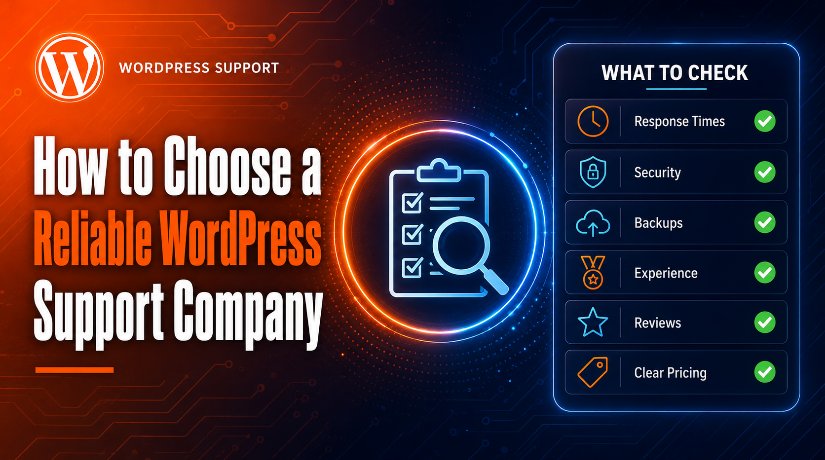
Work through these points for any company you consider. Together, they show how reliable a provider really is.
1. Response times
Ask how fast they reply, especially for urgent issues. Reliable providers offer clear response times, sometimes as a written promise. Fast help matters most when your site is down.
2. What the plan covers
Check the scope in detail. A strong plan includes updates, backups, security, and real support hours. If you are unsure what to expect, read our guide on what a support service includes.
3. Security practices
Ask how they protect your site. Look for firewalls, malware scans, and login protection. Good companies also harden your site and act fast if it is ever hacked.
4. Backups and restore testing
Backups are your safety net. Confirm they run regular backups and store them off-site. Even better, ask if they test restores, so the backup actually works when you need it.
5. Experience and skills
Look for a team with proven WordPress experience. Ask about their work with sites like yours, such as stores or business sites. Real expertise means faster, safer fixes.
6. Reviews and reputation
Check what real customers say. Read reviews on third-party sites, and look for case studies or testimonials. A strong track record is a good sign of reliable service.
7. Support channels
See how you can reach them. The best providers offer several channels, like chat, email, and phone. More channels usually mean faster, easier help.
8. Transparent pricing and reporting
Clear pricing avoids surprises. Make sure you know what each plan costs and covers. Good companies also send simple reports, so you always know what was done. Compare support plans side by side before you commit.
Red flags to avoid
Some warning signs should make you pause. Be careful if a company:
- Is slow to reply even before you are a customer
- Cannot explain what its plan includes
- Has no reviews or hides its pricing
- Does not run backups or offer security
- Locks you into a long contract with no trial
If you spot these signs, keep looking. A reliable provider is open and easy to work with.
How to compare your options
Once you have a shortlist, compare them the same way. Follow these steps.
- List your needs. Know what matters most, like speed, security, or backups.
- Ask the same questions. Use the eight checks above for each company.
- Weigh value, not just price. The cheapest plan is not always the best deal.
- Start small if you can. A short plan or trial lets you test the service first.
Still weighing your options? It helps to decide whether you want an agency or a freelancer first. You may also compare free vs paid support to set your budget.
Frequently asked questions
What is the most important thing to check?
Response time and scope come first. You want fast help and a plan that truly covers updates, backups, and security.
How can I tell if a company is reliable?
Look at reviews, clear pricing, and a written response-time promise. Reliable companies are open about what they do and how fast they do it.
Should I pick the cheapest plan?
No. Judge value, not just price. A cheap plan that skips backups or security can cost you far more later.
Can I test a company before committing?
Often, yes. Many providers offer a short plan, a trial, or a one-time fix. This lets you see the quality before you sign up. You can also get in touch to ask questions first.
Conclusion
Choosing a reliable WordPress support company is easier with a checklist. Check response times, scope, security, backups, experience, reviews, support channels, and clear pricing. Watch for red flags, and compare your options the same way.
Take your time and ask questions. The right partner keeps your website safe and fast, so you can focus on growing your business with peace of mind.

James is an experienced WordPress and WooCommerce specialist with over 10 years of practical experience. At WPChatSupport, he creates clear guides that help website owners fix WordPress issues, improve speed, secure their sites, and manage WooCommerce stores with confidence. His expertise includes store setup, plugin configuration, theme customization, payment gateway integration, and website troubleshooting. Through simple and helpful content, James supports users in solving technical problems and following best practices for online business growth.