Table of Contents
-
- Introduction
- Common Causes of the WordPress Blank Admin Page Issue
- Why You Should Not Ignore the WordPress Blank Admin Page Issue
- How to Fix the WordPress Blank Admin Page Issue and Get Your Dashboard Back
- Steps to Prevent This Issue from Happening Again
- Effective Plugins to Fix and Prevent This Issue from Happening Again
- Conclusion
Introduction
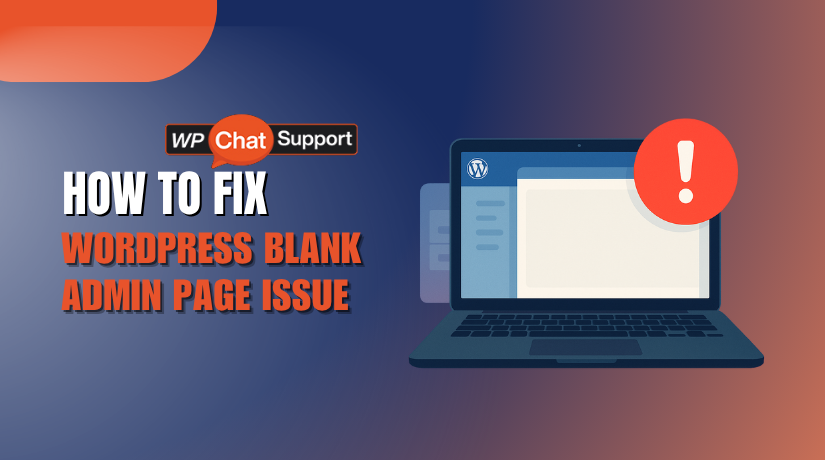
An admin page that is blank in WordPress is one of the most annoying problems. The White Screen of Death is another name for it (WSOD). This issue leaves you locked out of the WP admin blank screen, preventing you from managing your site. When this happens, you cannot add posts, update plugins, or make any changes to the site’s settings. You basically lose authority over your website.
The blank WordPress admin panel frequently shows up out of the blue. Everything is operating smoothly one moment, and then the WordPress dashboard blank page appears with nothing but a blank screen. It can be concerning if you don’t know what’s causing this issue. Thankfully, this problem is resolvable. This is a problem that many users have, and it is frequently easily resolved.
We’ll examine how to identify and resolve the WordPress admin page blank issue in this guide. To get your WordPress dashboard blank again, we’ll dissect the potential reasons and provide workable fixes.
Addressing this issue quickly is critical. Without access to your admin page, you can’t update your site, which can affect your website’s security, content, and functionality. By the end of this guide, you will know how to fix this problem effectively and prevent it from happening again.
Common Causes of the WordPress Blank Admin Page Issue
You may run into the blank WordPress admin page problem for a variety of reasons. The most typical reasons why a WordPress dashboard page is blank are listed below:
Plugin Conflicts
Plugins are essential for adding functionality to your WordPress site. However, some plugins may conflict with others, causing the WordPress blank admin page issue. These conflicts are more likely to happen after a plugin update or installation. In some cases, a single plugin update can break the WordPress admin page blank. If this happens, you may be left staring at a blank WordPress admin panel.
Theme Problems
Your website’s appearance is greatly influenced by your WordPress theme. However, a broken theme may also be the cause of your admin page not loading. A blank page in the WordPress dashboard could be the result of an out-of-date or incompatible theme. Occasionally, a WordPress admin blank screen can result from problems caused by theme updates or modifications made to theme files.
Corrupted Core Files
WordPress relies on a set of core files to run smoothly. If any of these files become corrupted, the wp admin blank screen might appear. Core file corruption often happens during an interrupted WordPress update or a failed installation. This can cause important files to be missing or incomplete, which may prevent the admin page from loading correctly.
PHP Errors
The programming language that powers WordPress is called PHP. Any PHP code mistakes could result in problems for your website, such as a blank WordPress admin page. Common PHP issues include memory limit errors or misconfigurations in the PHP settings. If your website exceeds the allocated memory limit or encounters syntax errors, it could trigger the blank WordPress admin panel.
Server Limitations
The performance of your WordPress website is greatly influenced by your web hosting environment. Sometimes, server-side limitations can cause a WordPress dashboard blank page. For example, if the PHP memory limit is too low, it may result in the admin page not loading. Another cause of problems like the wp admin blank issue is server configurations that are not optimised for WordPress. Your server’s insufficient resources may cause the website to load slowly or not at all.
Other Factors
The blank admin page in WordPress could be caused by additional variables in addition to the ones mentioned above. This can include issues like a misconfigured .htaccess file, database problems, or conflicts with other software running on the server. Despite being uncommon, these issues may nonetheless keep you from gaining access to your admin panel. Investigating these things might be worthwhile if none of the typical causes appear to be the issue.
Why You Should Not Ignore the WordPress Blank Admin Page Issue
When you face a WordPress blank admin page, it’s more than just a minor problem. Ignoring it can cause severe issues for your website. Let’s look at why you should take action quickly.
Impact on Website Management
A wp admin blank page locks you out of your dashboard. Without admin access, you can’t update content or manage settings. This directly affects site management, leaving the site stagnant. If the WordPress dashboard blank issue isn’t addressed, it prevents you from creating and editing posts or pages. You can’t install or update plugins either, making the site vulnerable.
SEO Consequences
Ignoring the blank WordPress admin panel can harm your site’s SEO performance. Google and other search engines favour content that is up to date, such blog posts and pages. If you can’t manage the site due to the WordPress admin page blank, search engines might not index your latest updates. This causes a loss in rankings, leading to reduced traffic.
Security Risks
When your WordPress dashboard blank page persists, security becomes a concern. Without admin access, you can’t apply essential security updates. Missing updates can leave your website open to attacks. Outdated WordPress, plugin, and theme versions are frequently the target of hackers. Your website becomes a prime target for security breaches if this problem is ignored.
Loss of Revenue Potential
An admin page in WordPress that is blank is a major issue for eCommerce websites. It prevents you from managing orders, updating product details, and adjusting inventory. Without access to the WordPress admin panel, your online store cannot function properly. This leads to lost sales, poor customer experience, and, ultimately, loss of revenue.
Brand Reputation Damage
A wp admin blank page sends a negative message about your website’s reliability. Customers expect websites to be available and functional at all times. If they can’t reach the admin panel to place orders or contact you, they may lose trust in your business. This harms your brand’s reputation, reducing customer confidence.
Difficulty in Debugging Other Issues
A blank WordPress admin page can be an indication of a deeper issue. If ignored, the problem can affect other parts of the site. Without access to the WordPress dashboard blank page, diagnosing and fixing issues becomes impossible. You can’t even identify whether the problem is due to plugins, themes, or server errors.
Increased Downtime
The longer you leave the WordPress admin page blank, the longer your website suffers. This increases downtime, which can harm your website’s performance. If you don’t act, the problem could spread, causing even more severe site issues. Ignoring the blank WordPress admin panel only leads to longer periods of site unavailability, which can frustrate users.
Loss of Data Control
Without access to the wp admin blank dashboard, you can’t manage critical website data. Data like settings, comments, and posts cannot be backed up. This loss of control over your content and site data can result in permanent data loss in case of further issues. The longer you wait, the more complicated data recovery becomes.
User Experience Impact
Your site visitors rely on a functioning WordPress dashboard blank page to maintain a smooth user experience. If the admin panel is down, site performance and content management suffer. Users may have a bad experience if they come across damaged or out-of-date content. They might even depart, which would reduce engagement and traffic to your website.
Time and Cost Efficiency
Ignoring a blank WordPress admin page leads to unnecessary time and cost. If left unchecked, the problem could escalate, requiring professional help. What could be a simple fix might turn into a bigger issue. The cost and duration of the repair increase with the amount of time that passes. Time and money can be saved by taking prompt action to solve the issue.
How to Fix the WordPress Blank Admin Page Issue and Get Your Dashboard Back
Many users frequently experience a blank admin page in WordPress. You can’t manage your website because of this issue, which stops you from accessing the WordPress admin blank page. Thankfully, a number of troubleshooting techniques can typically resolve this issue. A thorough tutorial on how to fix the blank WordPress admin panel problem and get back to your dashboard’s blank page can be found below.
#1 Clear Browser Cache
A simple cause of a blank WordPress admin page could be outdated files stored in your browser’s cache. Sometimes, the cached data conflicts with the updated version of WordPress, resulting in a WordPress dashboard blank page.
Solution
- Clear the cache and cookies in your browser to get rid of old files.
- You can typically do this in your browser settings under Privacy or History.
- Try accessing the wp admin blank page again after clearing the cache.
- If it still doesn’t work, try Incognito Mode or use a different browser to check if the issue is browser-specific.
Your browser can load the most recent version of the admin page if you clear the cache.
#2 Try a Different Browser
If clearing the cache didn’t resolve the issue, the problem may be related to your browser. Certain browsers or extensions might interfere with WordPress, causing a blank WordPress admin page.
Solution
- Open a different browser, such as Firefox, Chrome, or Safari, and try accessing the WordPress dashboard blank page.
- Alternatively, use Incognito Mode in your current browser to disable extensions and clear any cached data.
- If a different browser loads the page, the problem is probably with the browser.
To find out if the issue is unique to your browser, try viewing the page in a different browser.
#3 Enable Debug Mode
Enabling WordPress debug mode is a crucial step when facing a blank WordPress admin page. By activating debugging, WordPress will record any errors, assisting you in determining their root cause.
Solution
- Open the wp-config.php file located in the root directory of your WordPress installation.
- Add the following code just before the line that says “That’s all, stop editing! Happy blogging”:
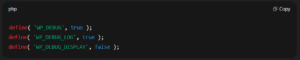
- After saving the file, check the wp-content/debug.log file for any errors or issues.
- These errors can guide you to the root cause of the wp admin blank page problem.
By turning on debug mode, WordPress is able to record errors, which can aid in problem solving.
#4 Deactivate Plugins
Many times, a malfunctioning plugin can cause the WordPress dashboard blank page issue. Plugins that are outdated or incompatible can conflict with WordPress core files, preventing the admin page from loading.
Solution
- Open File Manager or FTP to your website, then select the wp-content/plugins folder.
- For the purpose of deactivating all plugins simultaneously, rename the plugins folder to something like plugins_old.
- Check if the WordPress admin page blank issue is resolved by loading the admin page.
- If it does, it’s because of one of the plugins. To find the problematic plugin, reactivate each one individually and rename the folder back to plugins.
Deactivating plugins will help you isolate the one causing the issue, so you can remove or replace it.
#5 Switch to Default Theme
A blank WordPress admin panel can also be caused by a problematic theme. To check if the theme is the issue, switch to a default WordPress theme.
Solution
- Access the wp-content/themes directory via FTP.
- Rename your active theme’s folder to theme_old. WordPress will then default to a standard theme, like Twenty Twenty-One.
- Try logging into the admin panel once more. If the page loads, your original theme is the problem.
- You have the option to change the theme or update it at this point.
Changing to the default theme aids in identifying whether the blank WordPress admin page is being caused by the theme.
#6 Increase PHP Memory Limit
A wp admin blank page can also result from insufficient PHP memory. WordPress might not have enough memory to process large requests, leading to a blank admin page.
Solution
- Open your wp-config.php file.
- Add the following line of code just before “That’s all, stop editing! Happy blogging”:
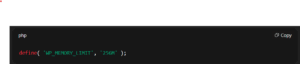
- Save the changes and refresh your admin page to check if the issue is fixed.
Increasing the memory limit helps WordPress run smoothly, especially for resource-intensive processes.
#7 Repair the Database
A corrupted database can prevent WordPress from loading the admin page, causing a blank WordPress admin page issue.
Solution
- Open your wp-config.php file.
- Add this line of code:

- Visit the following URL: http://yoursite.com/wp-admin/maint/repair.php.
- Click on Repair Database to fix any database corruption.
- Once done, remove the code from wp-config.php to keep the database repair tool secure.
Repairing the database often resolves issues that cause the WordPress admin page blank.
#8 Replace Core Files
Sometimes, corrupted core files can cause a blank WordPress admin panel. Replacing these files with fresh copies can resolve the problem.
Solution
- Download the latest version of WordPress from WordPress.org.
- Extract the files to your local computer.
- Upload the new files (excluding wp-content and wp-config.php) to your server using FTP. This will replace the corrupted core files.
- Check if the WordPress admin page blank issue is resolved.
Replacing the core files can help restore the admin page if it’s caused by file corruption.
#9 Regenerate .htaccess File
A corrupt .htaccess file can also block access to the wp admin blank page. Regenerating the .htaccess file can resolve this issue.
Solution
- Using FTP or File Manager, rename the .htaccess file to .htaccess_old.
- Try loading the admin page. If it loads, the issue is related to the .htaccess file.
- Go to Settings → Permalinks in the WordPress dashboard and click Save Changes to regenerate the .htaccess file.
This process restores default permalink settings, which can resolve WordPress dashboard blank issues.
#10 Check File Permissions
Incorrect file permissions can block WordPress from accessing the necessary files, causing the blank WordPress admin panel.
Solution
- Ensure that directories are set to 755 and files to 644 using FTP or File Manager.
- If the permissions are incorrect, change them to the proper settings.
- Incorrect permissions may prevent WordPress from accessing certain files, leading to the WordPress dashboard blank page.
Correcting file permissions ensures WordPress has the necessary access to load the admin page properly.
Steps to Prevent This Issue from Happening Again
After you have successfully resolved the blank WordPress admin page issue, you must take precautions to ensure that it doesn’t occur again. Prevention is simpler than repeatedly addressing the issue. A seamless, error-free WordPress experience can be guaranteed by adhering to these precautions. The following are some simple and useful steps.
- Regular Updates
To maintain your WordPress website secure and operational, regular upgrades are essential. Updates for WordPress are often released to resolve security flaws, enhance performance, and fix bugs. Ignoring these updates can lead to compatibility problems, which could leave the WordPress admin panel blank.
Solution
- To ensure that WordPress core, plugins, and themes are always up to date, enable automatic updates.
- Set a reminder to manually update plugins and themes every month.
- Updates should be tested on a staging site before being deployed to your live site. This makes sure there are no disputes.
- Keep an eye out for changes, particularly if you observe problems like a blank WordPress admin page.
By keeping your site updated, you prevent many problems, including the blank WordPress admin page.
- Use Reliable Plugins and Themes
Using poorly-coded plugins and themes can lead to conflicts that cause the WordPress dashboard blank page. Some plugins or themes are not updated regularly and can break your site. Choosing reliable, well-supported plugins and themes helps prevent the WordPress admin page blank issue.
Solution
- Installing plugins and themes should only be done from reliable developers or the official WordPress repository.
- Examine customer ratings and reviews prior to installing any theme or plugin.
- Before implementing them on your live site, test new themes or plugins on a staging area.
- Remove any inactive plugins and themes to avoid unnecessary bloat and conflicts.
By choosing quality, well-supported plugins and themes, you reduce the risk of encountering the blank WordPress admin panel.
- Backup Your Website Regularly
Backing up your website regularly is a critical step in keeping your WordPress site safe. Backups ensure you can restore your site quickly if something goes wrong, like a blank WordPress admin page. Without backups, you risk losing important data and having extended downtime.
Solution
- Use a dependable backup plugin to automate backups, such BackupBuddy or UpdraftPlus.
- Offsite backup storage can be kept in cloud services like Amazon S3, Dropbox, or Google Drive.
- Make backups automatically every day, every week, or after significant changes, such as upgrades.
- After updating plugins or themes, create a manual backup to ensure easy recovery.
Regular backups are your safety net. If something goes wrong, such as a blank WordPress admin page, you can easily restore your site.
- Monitor PHP Memory Limits
The most common cause of a WordPress admin blank page is inadequate PHP memory. In order to function effectively, WordPress needs a specific amount of RAM. WordPress may fail to load the admin page correctly if memory limitations are set too low.
Solution
- Check your PHP memory limit by contacting your hosting provider or using a plugin like WP Health Check.
- If the limit is low, increase it by adding this line to your wp-config.php file:

- Consult your hosting provider if you need further assistance with PHP memory limits.
Increasing your PHP memory limit helps avoid issues like a blank WordPress admin panel.
- Optimize the Database
A cluttered or unoptimized database can cause your WordPress site to slow down. It can also lead to issues like the WordPress admin page blank. Regularly optimizing your database ensures your WordPress site runs smoothly and efficiently.
Solution
- Clean up your database by eliminating unnecessary information like spam comments and post revisions with a plugin like WP-Optimize.
- Schedule regular database cleanups to keep everything in top shape.
- Run database repairs periodically to prevent corruption, which could lead to a blank WordPress admin page.
Optimizing your database regularly ensures that your site remains fast and minimizes the risk of problems like the WordPress dashboard blank page.
Effective Plugins to Fix and Prevent This Issue from Happening Again
Although you can follow preventive steps, sometimes problems like the blank WordPress admin page can still arise. In such cases, plugins can make troubleshooting easier and more effective. Below are some helpful plugins that can assist you in preventing or solving this issue.
Health Check & Troubleshooting Plugin
The Health Check & Troubleshooting plugin is an excellent tool for diagnosing issues with your WordPress site, including a wp admin blank page. This plugin is designed to troubleshoot problems without affecting your live site.
Solution
- Install and activate the plugin.
- Use Troubleshooting Mode to deactivate all plugins and switch to a default theme temporarily.
- Reactivate each plugin individually, and after each reactivation, examine the admin page to see which plugin is causing the WordPress admin panel to become blank.
This plugin speeds up debugging and helps you fix problems like blank pages in the WordPress dashboard.
WP-Optimize
The WP-Optimize plugin helps you optimize your database, clean up unnecessary files, and prevent problems like a blank WordPress admin page. An unoptimized database can cause performance issues and conflicts that may lead to the admin page problem.
Solution
- Install WP-Optimize and schedule regular cleanups to remove unwanted data like post revisions, spam comments, and transients.
- Run database optimization to reduce the chances of database-related issues, such as the WordPress dashboard blank page.
This plugin ensures your database stays clean and optimized, reducing the risk of problems like a blank WordPress admin panel.
WP Debugging
If the wp admin blank page issue persists, the WP Debugging plugin is a helpful tool for identifying errors. It enables WordPress debug mode without needing to manually edit the wp-config.php file.
Solution
- Install and activate WP Debugging.
- Review the debug log to identify any PHP errors or conflicts causing the WordPress admin page blank issue.
- Fix the errors based on the debug log information to restore access to the admin page.
WP Debugging makes identifying and resolving errors related to a blank WordPress admin page much easier.
Conclusion
The WordPress blank admin page issue can disrupt your workflow, but it is fixable. By following the troubleshooting steps outlined, you can resolve the issue effectively. Start by clearing your browser’s cache, deactivating plugins, or switching to a default theme. If the issue persists, enable debug mode to identify any errors. Also, increasing your PHP memory limit can prevent performance-related issues like the WordPress blank admin page.
Prevention is key to avoiding future occurrences of the WordPress blank admin page. Regular updates to WordPress, themes, and plugins will keep your site running smoothly. Additionally, ensure that you back up your site regularly to safeguard against data loss. Optimizing your database also helps maintain your site’s performance, reducing the risk of issues.
Plugins like Health Check & Troubleshooting, WP-Optimize, and WP Debugging can make troubleshooting easier and assist you in identifying the issue’s underlying cause. These tools offer insightful information about the possible cause of the blank page on your WordPress dashboard.
Seek help from a WordPress specialist if you are still experiencing the blank WordPress admin panel problem. By being proactive and performing routine maintenance, you can make sure that your WordPress website continues to function properly and without errors. You can prevent future frustrations with a blank WordPress admin page by adhering to these guidelines.

James is an experienced WordPress and WooCommerce specialist with over 10 years of practical experience. At WPChatSupport, he creates clear guides that help website owners fix WordPress issues, improve speed, secure their sites, and manage WooCommerce stores with confidence. His expertise includes store setup, plugin configuration, theme customization, payment gateway integration, and website troubleshooting. Through simple and helpful content, James supports users in solving technical problems and following best practices for online business growth.